Stable Diffusion Prompts: A Beginner’s Guide to Better Images


Here’s an uncomfortable truth about AI image generation: the model is rarely the bottleneck. The prompt is. I’ve watched people with top-tier GPUs produce muddy, incoherent images while someone on a modest laptop cranks out gallery-worthy work — and the entire difference was twenty words in a text box. Prompting is the actual skill of Stable Diffusion. The software is just the instrument.
The good news: prompting is learnable, and it follows patterns. There is an anatomy to a good prompt, a set of building blocks you can assemble deliberately instead of mashing the generate button and hoping. This guide teaches you those blocks — what to include, in what order, what to avoid — so your images start matching the picture in your head. If you’re still fuzzy on the underlying tech, read how Stable Diffusion turns text into images first.
What a Prompt Actually Does
A prompt isn’t a command — it’s a steering signal. Stable Diffusion starts from pure noise and gradually shapes it toward images that match your text, guided by what it learned during training about how words relate to visuals. Your prompt defines a region in the model’s vast space of possible images, and generation explores that region.
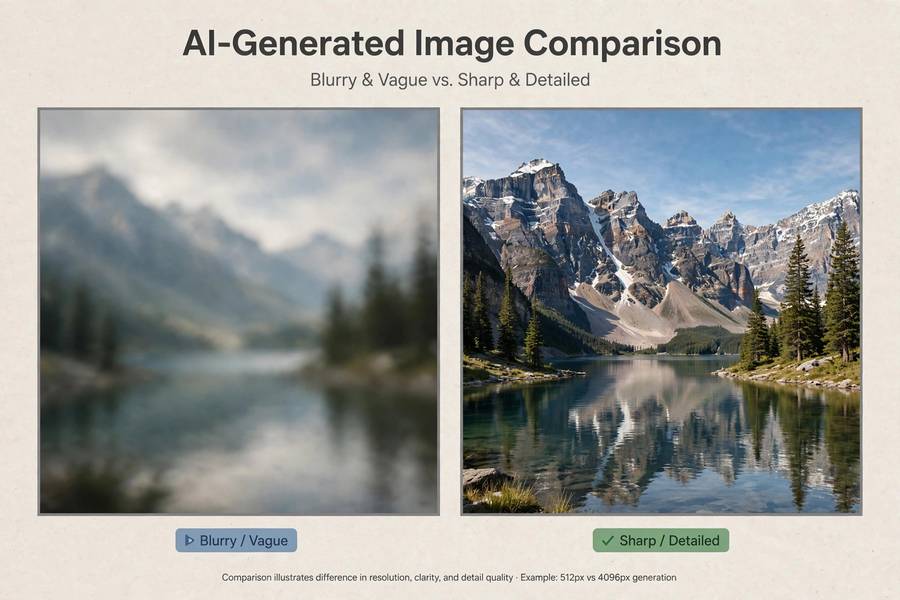
This mental model explains everything about prompting. Vague prompts define huge regions — the model wanders and produces something generic. Specific prompts narrow the region — the model has less room to improvise and more obligation to match your vision. You’re not instructing a servant; you’re fencing in a very talented, very literal improviser. Understanding what an AI model is under the hood makes this click: the model only knows patterns from training, and your words select which patterns to use.
The Anatomy of a Good Prompt
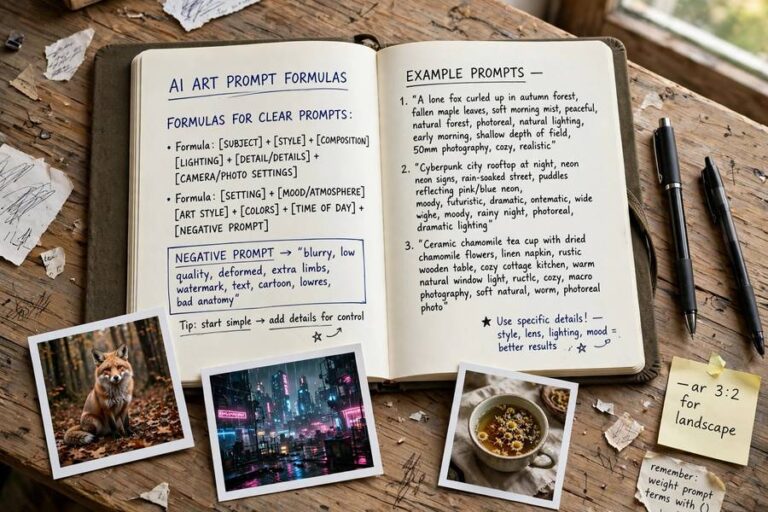
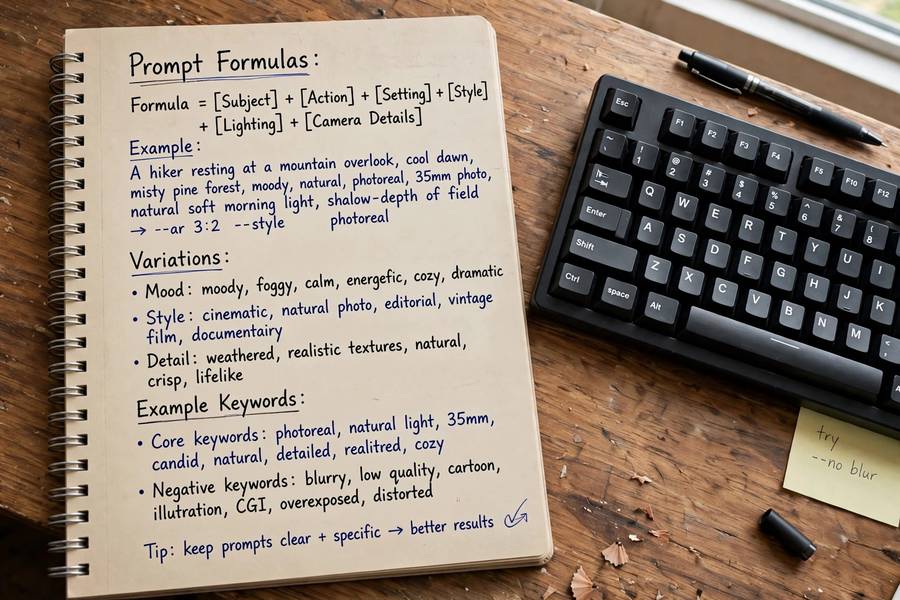
Most strong prompts follow the same skeleton, in roughly this order:
[Subject] + [action/pose] + [setting] + [style/medium] + [lighting] + [composition/details] + [quality terms]
Example: “a weathered fisherman mending nets on a wooden dock at dawn, oil painting style, warm golden-hour light streaming through mist, detailed brushwork, atmospheric, masterpiece”
Each block does a job. The subject anchors the content. The setting grounds it. The style determines the visual language. Lighting and composition shape the mood. Quality terms nudge the model toward its best-learned patterns. You don’t need every block every time — but knowing the blocks exist turns prompting from guesswork into craft.
Subject: Say What It Is, Clearly
Beginners under-specify the subject. “A dog” gives you a generic dog. “An elderly golden retriever with graying muzzle, sitting patiently” gives you a character. The model can’t read your mind, so put the specifics in words:
- Be concrete: “a red bicycle leaning against a brick wall” beats “a bike somewhere.”
- Use distinctive details: age, condition, color, material, expression — each adjective narrows the region.
- One subject per prompt (at first). Multiple subjects multiply the ways the model can misinterpret relationships between them. Master single subjects, then combine.
A useful test: read your prompt aloud and ask whether a human illustrator could draw it without asking questions. If they’d need to ask, the model will guess — and its guesses are where weirdness comes from.
Style and Medium: The Biggest Lever
If subject is the anchor, style is the rudder — the single highest-impact choice in most prompts. “Photorealistic,” “oil painting,” “anime,” “watercolor,” “cinematic still,” “charcoal sketch” — each invokes an entirely different region of the model’s learned visual space.
Beginners often omit style entirely, which leaves the model to pick — usually defaulting to a generic digital-art look. Always specify. Even “photograph” versus “digital painting” produces dramatically different results from the same subject.
You can also invoke specific aesthetics: “1980s sci-fi movie poster,” “National Geographic wildlife photography,” “ukiyo-e woodblock print,” “architectural blueprint.” The model learned these styles from captioned training images, so style references that existed as words in its training data work best. Obscure or invented style names work poorly — the model can’t reference what it never learned.
Details, Lighting, and Composition
These three blocks separate decent images from striking ones:
Lighting sets mood more than almost anything else. “Golden hour,” “moody chiaroscuro,” “soft studio lighting,” “neon-lit rainy street,” “dramatic rim lighting” — each is a complete atmosphere in two words. If your images feel flat, the missing ingredient is usually lighting, not subject detail.
Composition terms guide framing: “close-up portrait,” “wide establishing shot,” “rule of thirds,” “symmetrical composition,” “shallow depth of field,” “aerial view.” The model understands these photographic concepts because they appeared in training captions.
Details are the finishing touches: “intricate,” “highly detailed,” “weathered textures,” “bokeh background.” Use them sparingly — a few well-chosen detail words beat a laundry list. Which brings us to…
Quality Boosters (and When They Stop Helping)
Every beginner discovers quality booster phrases: “masterpiece,” “best quality,” “ultra detailed,” “8k,” “trending on artstation.” They work — mildly — because the model’s training data associated these words with highly-rated images.
But there’s a saturation point. Stacking six boosters doesn’t stack the effect; it dilutes your prompt’s focus. The model has limited “attention” for your words, and every token spent on “ultra mega masterpiece quality” is a token not spent describing your actual subject. One or two boosters, placed at the end, is the professional standard. Beyond that you’re performing a ritual, not engineering a result.
Also worth knowing: some boosters bias the style. “Trending on ArtStation” pushes toward digital fantasy art whether you want it or not. Choose boosters that match your intended style, or skip them and let the content blocks do the work.
Negative Prompts: Telling It What You Don’t Want
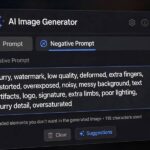
The negative prompt is the most underused beginner tool. It’s a second text box where you list what to avoid: “blurry, low quality, distorted, watermark, text, extra limbs, deformed hands.”
Why it matters: the model sometimes drifts toward common failure modes — mangled hands, garbled text, watermarks (learned from stock photos). Naming these in the negative prompt actively steers away from them. A solid starter negative prompt that works for most images:
“blurry, low-res, distorted, deformed, watermark, text, logo, oversaturated, grainy”
Keep it consistent while you learn, then customize per image. Negative prompts for anatomy (“extra fingers, mutated hands”) belong on portraits; negatives for text (“words, letters, signage”) belong on scenes where the model might hallucinate writing.
The Beginner Mistakes Everyone Makes
Prompt novels. Writing 200 words doesn’t help — the model weights early words more and effectively ignores the tail. Aim for 20–60 well-chosen words. If your prompt needs paragraphs, it’s two prompts.
Contradictions. “Photorealistic oil painting” or “bright sunny night scene” — the model can’t satisfy both and produces mush. Pick one direction per attribute.
Changing everything at once. You get a bad image and rewrite the entire prompt. Now you don’t know what fixed or broke it. Change one block at a time — that’s how you learn what each block does.
Ignoring the seed. The seed controls the starting noise. Love an image’s composition but not its details? Reuse the seed with a tweaked prompt. Beginners regenerate randomly and wonder why results vary wildly.
Blaming the model. Nine times out of ten, a bad image is a vague prompt, not a bad model. Before switching checkpoints, try specifying more.
A Practice Routine That Actually Works
Deliberate practice beats random generation. Try this:
- One subject, ten variations. Pick a simple subject and generate ten versions, changing only the style block each time. You’ll internalize what style words do faster than any tutorial.
- Copy, then modify. Find prompts shared by the community for images you admire. Run them, then change one element. This is how everyone learns — prompting has a folk tradition, and studying others’ prompts is legitimate education.
- Keep a prompt journal. Save prompts that worked with the images they produced. Patterns emerge: you’ll discover your own reliable formulas.
- Study the failures. When an image goes wrong, diagnose which block failed before regenerating. Was the subject vague? The style unspecified? The contradiction hidden?
Within a few weeks of this, you’ll prompt better than 90% of casual users. The skill compounds — and unlike the hardware, it transfers to every image model you’ll ever use, including hosted ones like how Midjourney works under the hood.
Weighting and Emphasis: Making Words Count More
Not every word in your prompt deserves equal attention, and in AUTOMATIC1111’s syntax, they don’t have to get it. Parentheses add emphasis — (red dress) hits harder than red dress — and square brackets reduce it: [crowd] tells the model the crowd matters less. You can stack them: ((red dress)) is stronger still. For precise control, use the numeric form: (red dress:1.3) sets the weight to 1.3, where 1.0 is the default.
I reach for this when the model keeps dropping an element. Say your prompt is “a knight standing beside a white horse in a foggy forest” and the horse keeps vanishing — (white horse:1.2) usually fixes it without rewriting anything else. It’s surgical: you boost one block instead of rearranging the whole prompt.
Two cautions from experience. First, weights above roughly 1.4 start producing artifacts — oversaturated colors, warped shapes, that overcooked look. If 1.3 doesn’t work, the problem is usually the prompt’s structure, not the weight. Second, this syntax is interface-specific: it works in A1111 and its forks, but ComfyUI handles emphasis differently, and SDXL’s natural-language prompting needs it less often. Learn weighting as a repair tool, not a crutch — well-structured prompts need little of it.

Frequently Asked Questions
Aim for 20–60 well-chosen words. The model weights early words more heavily, so front-load the important details. Extremely long prompts dilute focus and the tail gets effectively ignored.
A negative prompt lists things you want to avoid, like “blurry, watermark, extra limbs.” It steers generation away from common failure modes. A starter negative prompt of “blurry, low-res, distorted, watermark, text” works well for most images.
Mildly — they nudge the model toward patterns associated with highly-rated training images. But stacking many boosters dilutes your prompt. One or two at the end is the professional standard; the subject and style blocks matter far more.
Usually because the prompt under-specifies subject and omits style. Add concrete details (age, material, expression), always name a style or medium, and specify lighting. Vague prompts produce vague images.
The seed sets the starting random noise for generation. Reusing a seed with a tweaked prompt lets you iterate on a composition you like instead of rolling the dice fresh each time. It’s the key to controlled experimentation.
Keep reading: