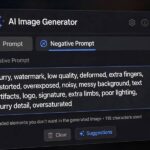
Every Midjourney user has a nemesis: the thing that keeps showing up uninvited. For me it was text — gibberish captions materializing on otherwise perfect images, like the AI was signing its work in a dead language. The fix was two characters plus a word: --no text. Negative prompting is Midjourney’s eraser, and most users either don’t know it exists or use it wrong.
This Midjourney negative prompts guide covers how --no actually works, what it’s good at excluding, where it fails, and the alternative techniques for when exclusion isn’t enough. The mechanism makes more sense once you understand how Midjourney works under the hood.
Table of Contents
- How –no Works (and Why It’s Not a Delete Key)
- The Essential –no List: What to Exclude by Default
- Syntax That Actually Works
- What –no Is Bad At
- The Negation Trap: Why “Not Ugly” Backfires
- Smarter Alternatives When –no Isn’t Enough
- Building Your Personal Exclusion List
- Negative Prompting for Art Styles
- When –no Fights Your Prompt
- Worked Example: Cleaning Up a Portrait
- Frequently Asked Questions

How –no Works (and Why It’s Not a Delete Key)
The --no parameter tells Midjourney to steer away from specified concepts: --no text, watermark, blurry. But here’s the critical mental model — it’s not a delete key, it’s a repellent. The model doesn’t remove the concept from its understanding; it reduces the probability of generating it. Think of it as telling a chef “less salt” rather than “remove all salt molecules.”
This distinction matters because --no is probabilistic, not absolute. It dramatically reduces unwanted elements but doesn’t guarantee their absence — you’ll still occasionally get text in an image with --no text. Understanding this saves frustration: --no shifts the odds heavily in your favor, and combined with re-rolling the failures, that’s usually enough. For the full prompting foundation, see this prompt engineering primer for beginners.
The Essential –no List: What to Exclude by Default
Certain unwanted elements are so common they deserve a default exclusion list. Mine, refined over hundreds of generations:
--no text, watermark, signature— kills gibberish captions, stock watermarks, and fake artist signatures. My default on nearly everything.--no blurry, out of focus— when you want crisp detail (skip for intentional bokeh work).--no extra limbs, deformed hands— reduces the classic AI anatomy glitches. Not perfect, but helps noticeably.--no frame, border— when you want full-bleed images without decorative edges.--no cartoon, 3d render— when chasing photorealism and the model drifts stylized.
Assemble your own defaults based on your recurring nemeses. Paste them at the end of every prompt until they’re muscle memory. Two seconds of typing that prevents entire categories of re-rolls.
Syntax That Actually Works
The mechanics are simple but have quirks: --no goes at the end of the prompt with other parameters. Multiple items are comma-separated: --no text, watermark, blurry. You can also use multi-word concepts: --no crowded background. Weighting works too: --no text::2 applies stronger exclusion to text than to other items (though the syntax for weights has shifted across versions — test current behavior).
What doesn’t work: putting --no in the middle of the descriptive text, using it without the double dash, or expecting it to understand complex instructions like --no the thing in the background on the left. Keep exclusions to simple, concrete concepts — single nouns and short phrases the model clearly understands.
What –no Is Bad At
Honesty section. --no struggles with: abstract qualities — --no ugly is nearly useless because “ugly” has no consistent visual meaning to the model. Fine details — it can’t reliably exclude “the third button on the shirt.” Strongly associated concepts — asking for a “wedding” with --no people fights the model’s deepest associations; you’ll get empty chapels at best. Style-level exclusions — --no photorealistic when generating photorealistic content is self-sabotage the model resolves unpredictably.
The pattern: --no works on concrete, detachable elements (text, watermarks, frames) and fails on abstract, integral, or contradictory ones. Match the tool to the job.
The Negation Trap: Why “Not Ugly” Backfires
This deserves its own section because it’s the #1 negative-prompting mistake: writing negations in the descriptive text instead of using --no. “A beautiful landscape, not ugly, no people, without text” — the model’s text encoder processes concepts, and negation is weakly represented. It often latches onto “ugly,” “people,” “text” as things to include, because those words activated those concepts.
The rule is absolute: never negate in the description; always exclude with --no. “Beautiful landscape” + --no people, text works. “Beautiful landscape without people or text” frequently doesn’t. This quirk comes from how the model was trained — on captions describing what images contain, not what they lack — which is why how to use Midjourney effectively teaches affirmative description as the core skill.

Smarter Alternatives When –no Isn’t Enough
When exclusion fails, don’t just re-roll harder — change strategy:
Describe what you want instead. Rather than --no dark, write “bright airy lighting.” Affirmative description beats negation because it gives the model something to move toward, not just away from.
Use inpainting/vary-region. For a specific unwanted element in an otherwise good image, regenerate just that region rather than fighting the whole composition.
Change the style context. Gibberish text plagues “poster” and “book cover” prompts because those formats contain text in training data. Reframe as “illustration” or “artwork” and the text problem often vanishes — you removed the association, not just the visible issue.
Accept and edit. For final production work, a quick pass in any photo editor removes the stray watermark or extra finger faster than twenty re-rolls. Professionals do this routinely; purists who insist on “pure” generations waste hours.
Building Your Personal Exclusion List
End with process: keep a running note of your recurring unwanted elements. After twenty generations, patterns emerge — everyone’s nemesis list is slightly different (mine: text, watermarks, and oversaturated colors). Turn your top five into a default --no string you append habitually. Revisit it quarterly as models update — each new version fixes some glitches and introduces new ones. Your exclusion list is a living document, and maintaining it is one of the highest-ROI habits in prompting. Review it whenever Midjourney ships a model update, since each version fixes old glitches and introduces new ones worth excluding.
Negative Prompting for Art Styles
–no isn’t just for artifacts; it’s a style-steering tool. Want photorealism but the model keeps drifting painterly? –no painting, illustration nudges it back. Want clean vector logos but getting gradients and shadows? –no gradients, shadows, 3d. You’re using exclusion to fence the model into your chosen aesthetic territory.
This works because styles are clusters of associated features — excluding the cluster’s hallmark features pushes generation toward adjacent territory. It’s often more effective than adding style words, because style words compete with the model’s defaults while exclusions remove the defaults’ escape routes. The advanced move is combining both: affirmative style (“flat vector logo”) plus exclusions of the styles you don’t want (“–no photorealistic, 3d render, gradients”). Fence it in from both sides.
When –no Fights Your Prompt
The trickiest failures happen when your exclusions contradict your subject. “Cyberpunk street –no neon” is the model equivalent of ordering a pizza with no cheese — the exclusion attacks the subject’s identity, and results get weird: washed-out scenes, confused compositions, or the model quietly ignoring your –no.
The diagnostic: if results get worse when you add an exclusion, the exclusion is probably fighting the concept. Solutions in order: first, try a weaker, more specific exclusion (–no neon signs instead of –no neon). Second, reframe the subject to reduce the association (describe the scene’s mood rather than naming the genre). Third, accept the element and remove it in post — some battles aren’t worth the GPU time. –no is a precision instrument; pointing it at the heart of your concept is like performing surgery on yourself. Aim at the periphery.
Worked Example: Cleaning Up a Portrait
Let’s walk a real scenario. Prompt: “professional headshot of a smiling man in suit, office background, photorealistic.” First generation: decent, but there’s a gibberish lanyard text, a watermark-ish swirl in the corner, and the background is cluttered. Assessment: three detachable problems — text, watermark, clutter.
Fix: append “–no text, watermark, signature, cluttered background”. Regenerate. Result: clean portrait, simple background. The –no didn’t fight the subject (a man in a suit has no essential connection to text or watermarks), so it worked cleanly. If the background were still busy, the next step would be affirmative: “plain gray studio background” — describing the desired rather than excluding the unwanted. That’s the full playbook in miniature: identify detachable elements, exclude with –no, and switch to affirmative description for anything integral. Two tools, used in the right order.

Frequently Asked Questions
Use the –no parameter at the end of your prompt: “–no text, watermark, blurry”. It reduces the probability of those concepts appearing — it’s a repellent, not a guarantee. Multiple items are comma-separated.
The most useful defaults are “–no text, watermark, signature” to prevent gibberish captions and fake signatures. Add “blurry”, “frame, border”, or “extra limbs” based on your recurring issues.
–no is probabilistic, not absolute — it shifts odds rather than guaranteeing exclusion. It also struggles with abstract concepts (ugly), fine details, and concepts strongly associated with your subject. For stubborn cases, use affirmative description or region editing instead.
No — never negate in the descriptive text. The model often latches onto negated words (“text”, “ugly”) as concepts to include. Always use the –no parameter for exclusions and keep descriptions affirmative.
Sometimes, but it fights the model’s associations — a “wedding –no people” prompt struggles because weddings strongly imply people in training data. Better to describe an empty scene affirmatively: “empty wedding chapel, no guests yet”.
Keep reading: