AI Projects for Beginners to Learn: 12 Ideas That Teach


Tutorials teach you to follow instructions. Projects teach you to think. That’s the whole argument for project-based learning in one sentence — and it’s why the fastest AI learners I know all share one habit: they started building embarrassingly early, long before they felt ready.
But “build a project” is useless advice without specifics. Beginners need ideas calibrated to their level: hard enough to teach, easy enough to finish. Abandoned projects teach nothing. So here are twelve ideas, ordered from “this weekend” to “this quarter,” each chosen because it teaches skills that transfer. For where projects fit in your overall learning path, see my guide on how to learn artificial intelligence. These twelve are ordered by effort and arranged so each one builds on the skills of the last.

Why Projects Beat Tutorials (The Short Version)
Tutorials give you curated problems with known solutions. Real projects give you messy problems with unknown solutions — which is what actual AI work looks like. The gap between “I completed the course” and “I can build things” is entirely bridged by projects.
There’s also a motivation mechanism: tutorials are easy to abandon because nothing is at stake. A project you’re building for yourself — to solve your problem, to show an employer, to scratch an itch — has gravity. You’ll push through the frustrating parts because the outcome matters to you.
Rule of thumb: from your second week of learning onward, spend at least half your time building. The tutorial-to-project ratio should tilt toward projects as fast as you can manage.
Level 1: First Contact (Weekend Projects)
These teach fundamentals and — critically — are finishable in a weekend. Finishing matters more than ambition at this stage.
1. Personal AI assistant with custom instructions. Configure ChatGPT or Claude with detailed custom instructions for a specific role: your writing coach, your workout planner, your study buddy. This teaches prompting as a discipline — specifying behavior precisely — and you’ll use the result daily. Deceptively simple, genuinely useful.
2. The “explain my field” explorer. Pick a topic you know well and have AI explain it back at increasing depth levels, then fact-check the outputs against your knowledge. This teaches you more about AI limitations than any article — you’ll see exactly where models are confident, vague, or wrong. It builds the evaluation instinct every AI practitioner needs.
3. Automated content digest. Use a no-code tool (Make or Zapier) to pull articles on a topic you follow, have AI summarize each, and deliver a morning digest. Teaches: API thinking, chaining AI capabilities, and dealing with real-world messiness (broken feeds, bad summaries). You’ll actually use this.
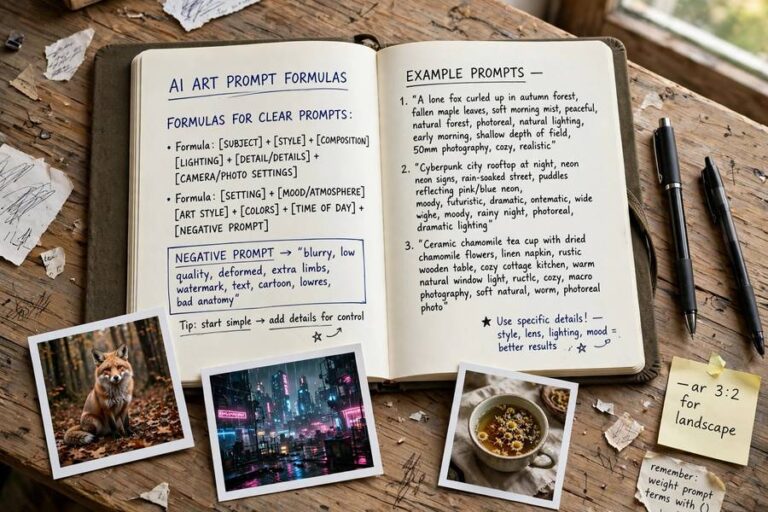
4. Image prompt laboratory. Spend a weekend systematically testing Midjourney or DALL-E: same subject, varying styles, lighting, and composition terms. Keep a log of what each term does. This teaches controlled experimentation — changing one variable at a time — which is the scientific method applied to AI. Plus you get cool images.
Level 2: Real Builds (2–4 Weeks Each)
Now you’re building software, even if simple. Basic Python helps; no-code alternatives exist for most.
5. Document Q&A chatbot. Upload your own documents (notes, manuals, a book) and build a system that answers questions from them — the classic RAG pattern. This teaches the single most commercially valuable AI pattern: grounding models in real data. Start with a no-code tool like Flowise, then rebuild in Python when ready.
6. Sentiment analyzer for something you care about. Analyze reviews of your favorite restaurant, tweets about your team, comments on your blog. Teaches: data collection, a real ML pipeline (even a simple one), and evaluation — is your analyzer actually right? Small, complete, and genuinely interesting.
7. AI-powered personal tool. Something that solves your problem: a meal planner that respects your dietary restrictions, a workout generator based on available equipment, a study scheduler built around your exam dates. Personal stakes make you push through difficulty, and “I built this for myself” is compelling in any portfolio.
8. The comparison project. Take one task and solve it three ways: pure prompting, RAG, and fine-tuning (or three different models). Compare rigorously. This teaches the engineering judgment of choosing approaches — the skill that separates senior practitioners from framework operators. Write up the comparison; it’s portfolio gold.
Level 3: Portfolio Pieces (1–3 Months)
These are substantial enough to anchor a portfolio or impress a hiring manager. Pick one that aligns with your target direction.
9. Full-stack AI application. A complete product: frontend, backend, AI integration, user accounts, deployment. Example: a writing assistant with saved projects, or a niche Q&A tool for a specific profession. Use Streamlit or Gradio to move fast. This proves you can ship — the rarest and most valued beginner trait.
10. Fine-tuned specialist. Take an open model and fine-tune it for a narrow task: your company’s support tone, a specific writing style, a domain vocabulary. Document the process honestly, including what didn’t work. Fine-tuning projects demonstrate understanding of how AI models are trained at a practical level.
11. AI agent that does real work. Build an agent that completes multi-step tasks autonomously: researching a topic and writing a report, monitoring prices and alerting you, triaging your inbox. Agents are the frontier of applied AI — a working agent project signals you’re current, not just competent.
12. The replication project. Reproduce a result from a paper or a well-known project, then extend it slightly. This is the closest to research work a beginner can do, and it teaches scientific rigor: can you actually reproduce what someone claimed? Employers and grad schools both respect this enormously.
How to Pick Your Project
Follow the “interested + useful + finishable” rule. You need genuine curiosity (to survive frustration), real utility (to force real requirements), and a scope you can complete (to get the finishing effect). Two out of three isn’t enough — an interesting, useful project you’ll never finish teaches less than a boring one you complete.
Scope ruthlessly. Your first instinct about scope is always 3x too big. Cut it in half, then cut it again. A tiny finished project beats a grand abandoned one every time. You can always extend a finished project; you can’t extend one you quit.
Build in public. Share progress — a repo, a thread, a demo video. Public building creates accountability, attracts feedback, and leaves a trail that becomes your portfolio without extra effort.
The Project Writeup That Gets You Hired
The project itself is half the value; the writeup is the other half. For each project, document:
- The problem in one paragraph — what and why
- Your approach — what you tried, including what failed
- Results — honest numbers, screenshots, demos
- What you’d do differently — this section reveals judgment, and it’s what interviewers actually read
A GitHub repo with a great README beats a perfect project with no documentation. Communication is part of the skill.
Mistakes That Kill Beginner Projects
Tutorial-hopping disguised as building. Following a “build X” tutorial line-by-line is still a tutorial. The learning starts when you deviate: change the dataset, add a feature, break it and fix it.
No version control. Learn Git basics on day one of project work. Losing a week’s work to a bad edit is a rite of passage you can skip.
Perfectionism. Your project will be rough. Ship it rough. “Done and documented” beats “perfect and unfinished” without exception.
Building alone in silence. Get feedback early — from communities, mentors, anyone. A five-minute conversation can save five days of wrong-direction work.
For a map of the tools these projects use, my overview of AI tools explained covers the landscape.
Twelve ideas, three levels, one principle: build early, build often, finish what you start. Your portfolio of finished projects — rough edges and all — will teach you more than any course and impress more than any certificate. Pick the smallest one that excites you, and start this weekend.
One final tip on momentum: schedule your project time like a meeting with someone important, because it is — it’s a meeting with the person you’re becoming. An hour a day beats a heroic weekend once a month. Consistency compounds; intensity burns out. The beginners who become practitioners aren’t the smartest ones, they’re the ones who showed up again on Tuesday.

Frequently Asked Questions
Start with weekend projects: a custom-instructed AI assistant, an automated content digest with no-code tools, or a systematic image-prompt experiment. Then progress to a document Q&A chatbot (RAG), a sentiment analyzer, and finally a full-stack AI application or fine-tuned model as portfolio pieces.
Not for the first level — prompting projects, no-code automations, and evaluation exercises need zero code. For deeper projects (RAG systems, fine-tuning, deployed apps), basic Python helps enormously, though no-code alternatives exist for many patterns.
Finished projects with good writeups are the strongest credential for AI roles — stronger than certificates. They prove you can ship, debug, and communicate. Document each project with the problem, your approach, honest results, and what you’d do differently.
Build a custom-instructed AI assistant for a specific role (writing coach, study buddy) and use it daily. It teaches prompting as a discipline, requires zero code, takes a weekend, and produces something genuinely useful — the perfect first win.
Quality over quantity: 3-5 finished, well-documented projects beat 20 abandoned ones. Aim for one weekend project monthly at first, then one substantial portfolio piece per quarter. Each should teach you something the previous ones didn’t.