
Small businesses don’t have AI departments, data science teams, or patience for six-month implementations. What they have is a owner who does twelve jobs before lunch and a to-do list that never ends. That’s exactly why AI fits small business better than the enterprise hype suggests — not as a transformation program, but as a set of quiet tools that take hours off the week. I’ve watched enough small operations adopt AI to know which use cases actually pay off and which are conference-stage fiction. For the bigger picture, see how AI is used in business.
Table of Contents
- The Small Business AI Test
- Customer Service: The Chatbot That Never Sleeps
- Marketing Content Without the Agency Retainer
- Admin and Bookkeeping: The Invisible Hours
- Scheduling and the Calendar Tetris
- Hiring: Screening Without the Stack of Resumes
- Sales Follow-Up That Actually Follows Up
- Inventory and the Stockout Problem
- What to Skip (For Now)
- Frequently Asked Questions
The Small Business AI Test
Before the use cases, the filter I apply to all of them. A small business AI tool has to pass three tests: it must work in an afternoon (no implementation project), it must save more time than it costs to manage (net positive from week one), and it must not require new expertise to operate (the owner can run it between other jobs). Enterprise AI fails all three. The tools below pass, which is why they’ve actually been adopted rather than merely purchased.
This filter also explains the adoption pattern. Small businesses didn’t adopt AI through strategy decks; they adopted it the way they’ve adopted every useful tool — one painful problem at a time, starting with whatever hurt most. The chatbot came because the owner was answering the same five questions at midnight. The content tool came because the blog hadn’t been updated in eight months. Demand-led adoption, problem by problem. It’s the healthiest way to adopt technology, and large companies could learn from it.
Customer Service: The Chatbot That Never Sleeps
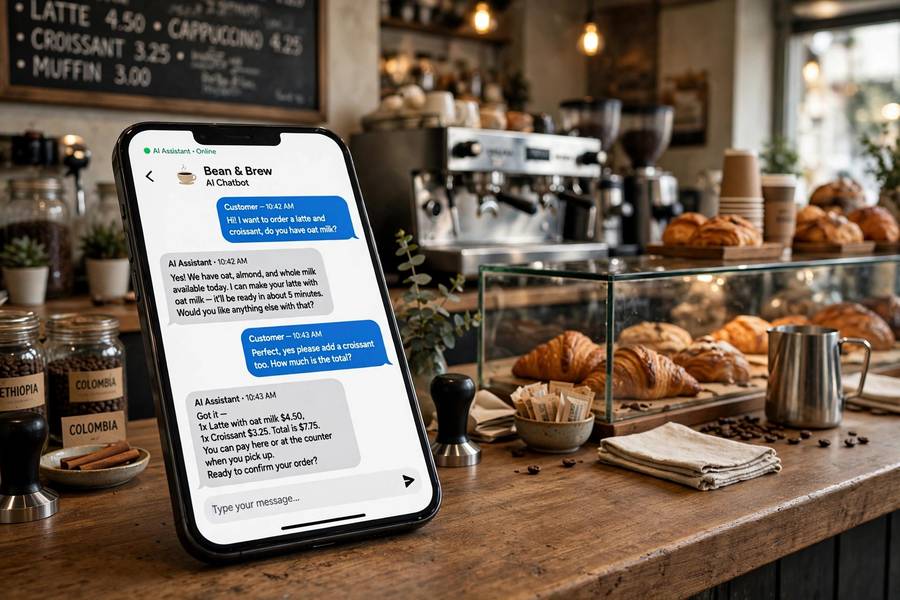
The highest-ROI AI use case in small business is also the simplest: answering common questions automatically. A chatbot trained on your FAQs — hours, pricing, policies, how to book — handles the repetitive 80 percent of inquiries, day and night, while the owner handles the 20 percent that needs a human.
The economics are direct. Every “what are your hours?” answered at 11pm by a bot is a customer who didn’t bounce to a competitor. Every booking question resolved without a phone call is fifteen minutes back. The tools for this are mature and cheap — many under fifty dollars a month — and setup is genuinely an afternoon’s work: feed it your FAQ page, test the answers, go live. The failure mode is overreach: bots that try to handle complex complaints instead of escalating them. The rule is simple — the bot answers questions, humans handle problems — and businesses that follow it love the results.
Marketing Content Without the Agency Retainer
Small businesses know they should publish — blog posts, social content, email newsletters — and most don’t, because content takes time they don’t have. AI writing tools changed the unit economics: a blog post goes from a four-hour ordeal to a forty-five-minute edit of a solid draft. Social captions, product descriptions, email campaigns — the first draft problem disappears.
The honest version: the AI drafts, the human edits. Unedited AI content is recognizable and mediocre — it says nothing specific, in a voice that’s nobody’s. But as a starting point it’s transformative, especially for owners who know their business cold but freeze in front of a blank page. The workflow that works: owner provides the specifics (the story, the offer, the details only they know), AI provides the structure and the fluency, owner edits for voice and accuracy. How to use AI at work covers the prompting skills that make this sing.
What this replaced isn’t the agency — most small businesses never had one — it’s the nothing. The choice was never “AI content vs agency content”; it was “AI-assisted content vs no content.” Against that baseline, it’s a rout.
Admin and Bookkeeping: The Invisible Hours
The least glamorous use case is the most universally valuable: AI handling the administrative sludge. Expense categorization from receipt photos. Invoice data entry. Email triage — drafting replies to the routine ones, flagging the important ones. Meeting transcription and summaries. None of this is exciting. All of it is hours.
Receipt scanning is the canonical example. The owner photographs receipts; the AI extracts amounts, dates, vendors, and categories; the bookkeeping software reconciles. What was a Sunday-afternoon shoebox ritual becomes a thirty-second habit. Multiply across invoicing, payroll inputs, and tax prep, and the admin stack shrinks dramatically.
The deeper value is cognitive, not just temporal. Admin work isn’t just time-consuming — it’s attention-fragmenting. Every “I need to deal with that invoice” sitting in the back of the owner’s mind is a tax on the strategic thinking the business actually needs from them. AI admin tools don’t just save hours; they clear mental RAM. Owners consistently report this as the benefit they didn’t expect and now value most.

Scheduling and the Calendar Tetris
Service businesses — salons, clinics, repair shops, consultants — live and die by the calendar, and AI scheduling tools have quietly become standard. Online booking with automatic confirmations, reminders that cut no-shows, waitlist management, and smart scheduling that clusters appointments efficiently. The no-show reduction alone often pays for the tool: a single prevented no-show per month covers the subscription for most of these services.
The newer development is AI handling the scheduling conversation itself — the back-and-forth of “does Tuesday work? how about Thursday morning?” that used to eat receptionist hours. The AI proposes times, handles rescheduling, sends reminders, and only escalates the genuinely complicated cases. For businesses where the phone used to ring constantly with scheduling trivia, the silence is golden.
Hiring: Screening Without the Stack of Resumes
Small businesses hire infrequently and painfully — a job post brings a flood of applications, and the owner, who is also the HR department, has to read them all. AI screening tools rank applicants against the job requirements, surface the promising ones, and draft the outreach. Some can conduct initial screening conversations.
The important caveat: screening AI must be watched for bias. Tools trained on historical hiring data can perpetuate historical patterns — this is well documented, and small businesses don’t have compliance departments to catch it. The safe approach: use AI for the mechanical work (ranking against stated criteria, scheduling interviews, drafting messages) and keep the actual judgments human. The tool narrows the field; the owner picks the person. Used that way, it turns a dreaded process into a manageable one.
Sales Follow-Up That Actually Follows Up
The statistic every small business owner recognizes: most sales are lost to slow follow-up, not to competition. The quote goes out, the prospect goes quiet, the owner means to follow up, the week intervenes. AI fixes this mechanically: automatic follow-up sequences, lead scoring that flags who’s actually engaged, reminders that surface the right prospect at the right time.
CRM tools with built-in AI have brought this within reach of very small operations — the kind with no sales team, where the owner is the sales team. The AI drafts the follow-up emails (the owner approves), tracks engagement, and nudges when a hot lead goes cold. It’s not sophisticated; it’s just consistent. And consistency, in small business sales, beats brilliance. The businesses that implement this usually discover their close rate was never the problem — their follow-through was.
Inventory and the Stockout Problem
For product businesses, the twin nightmares are stockouts (losing sales) and overstock (tying up cash). AI demand forecasting — even the simple versions built into modern point-of-sale and inventory systems — predicts what you’ll need based on sales history, seasonality, and trends. Reorder suggestions arrive before the shelf goes empty.
This used to be enterprise software with enterprise pricing. It’s now a feature in tools small retailers already use. The sophistication is modest — it’s pattern recognition on your own sales data, not magic — but the effect is real: fewer stockouts, less dead stock, less cash trapped on shelves. For a small retailer, that’s working capital freed up, which is as close to found money as business gets.
What to Skip (For Now)
Honest list of what I’d skip. Custom AI development — building your own models or agents — is overkill for almost every small business; the off-the-shelf tools cover 95 percent of needs. AI for complex financial planning or tax strategy: the stakes are too high and the models too confident — keep the accountant. Fully automated customer service with no human escalation: the savings aren’t worth the reputation risk. And any tool that requires changing how the business operates to fit the software — the tool should fit the business, not the reverse.
The meta-advice: start with one painful problem, solve it, then look for the next. The businesses that get the most from AI are the ones that adopted it incrementally, each tool earning its place. The ones that get the least bought a platform, attended the onboarding webinar, and never logged in again. How to grow a small business is a longer game; AI is one of the better force multipliers in it, used this way.

Frequently Asked Questions
The most effective uses are customer service chatbots, marketing content drafting, admin automation like receipt scanning, AI scheduling, hiring screening, sales follow-up automation, and inventory forecasting. Start with one painful problem and expand from there.
Yes. Most small business AI tools cost tens of dollars per month, and many useful capabilities are built into software businesses already use. The key test is whether a tool saves more time than it costs to manage, starting from week one.
Customer service chatbots typically deliver the highest return: they answer common questions around the clock, reduce interruptions, and prevent lost customers. Admin automation like receipt scanning and email triage is a close second for pure hours saved.
No. Modern small business AI tools are designed for non-technical users, with setup typically taking an afternoon. The valuable skill is knowing your business processes well enough to point the tool at the right problem.
Avoid custom AI development (overkill for most), fully automated customer service with no human escalation, AI for high-stakes financial or tax decisions, and any tool that forces the business to change its operations to fit the software.
Keep reading: