
HR departments adopted AI earlier than almost anyone, and they did it in the worst possible way first: automated resume screening that rejected good candidates for invisible reasons. The infamous examples — tools that downgraded resumes containing the word “women’s,” that penalized gaps for parental leave — are why bias in AI hiring systems became its own cautionary field. That history matters, because it means HR can’t afford the careless AI adoption other departments get away with. People processes are where AI’s mistakes hurt real people.
So let’s be honest about AI use cases in HR: which ones genuinely work today, which ones work only with heavy human oversight, and which ones you should keep fully human. This isn’t a vendor brochure. It’s a field guide, informed by how to use AI at work and by watching what HR teams actually do with these tools once the demo ends.
Table of Contents
- Resume Screening: The Original Use Case
- Job Description Writing
- Interview Scheduling and Coordination
- Onboarding Automation
- Answering Routine Employee Questions
- Analyzing Employee Surveys
- Performance Review Drafting
- What to Keep Fully Human
- How to Start Safely
- Frequently Asked Questions

Resume Screening: The Original Use Case
Resume screening was AI’s first big HR application and its most controversial. The value proposition is real: a popular posting can draw 500 applications, and no recruiter reads 500 resumes carefully. AI can surface the most relevant candidates in minutes. The danger is equally real: screening models learn from historical hiring data, and historical hiring data contains every bias your company ever had. A model trained on ten years of your engineering hires will faithfully reproduce ten years of your engineering biases.
The teams that do this well treat AI as a first-pass filter, never a final decision. They audit the tool’s recommendations regularly — do recommended candidates differ demographically from the applicant pool in ways the qualifications don’t explain? They strip identifying information before screening where possible. And they never let the model auto-reject. Every rejection-worthy pile gets a human glance, because the cost of a false rejection is invisible (you never meet the candidate you wrongly filtered out) while the cost of a false acceptance is just an interview.
If you’re evaluating a screening tool, ask the vendor how they test for bias, what data the model was trained on, and whether you can audit its decisions. If they can’t answer clearly, that’s your answer about the tool.
Job Description Writing
Writing job descriptions is the rare HR task where AI is almost purely helpful and the risks are low. Drafting a posting from scratch takes an hour or more of staring at a blank page; AI can produce a solid first draft in seconds from a few bullet points about the role’s responsibilities and requirements.
The real value isn’t speed, though — it’s consistency and inclusivity. AI drafts tend to be more structured than human-written ones, and you can specifically prompt for inclusive language: ask it to remove gendered terms, unnecessary degree requirements, and the laundry list of “nice-to-haves” that discourages qualified candidates from applying. Research consistently shows that overlong requirement lists filter out good candidates, especially women, who tend to apply only when they meet nearly all listed criteria.
Still review the output. AI-generated job descriptions sometimes invent requirements (five years of experience with a three-year-old technology) or copy industry boilerplate that doesn’t fit your company. The workflow is: human provides the raw material, AI drafts, human edits. Ten minutes instead of an hour, with a better result.
Interview Scheduling and Coordination
Nobody’s career was advanced by the thirty-email thread titled “Re: Re: Re: Interview availability.” Scheduling is pure coordination overhead, and AI handles it well. Modern scheduling tools can find slots across calendars, send invitations, handle rescheduling, and remind interviewers to submit feedback — the administrative plumbing of hiring that recruiters historically did by hand.
The sophistication varies. Basic tools just find open slots. Better ones coordinate multi-round interviews, ensuring the right interviewers meet the candidate in the right order, with buffer time and prep materials. Some integrate with video platforms and automatically generate interview links. For high-volume hiring — retail, hospitality, customer support — AI scheduling combined with initial screening can compress a two-week process into days.
The human touchpoint to preserve: the candidate experience. A candidate who receives warm, clear communication feels differently about your company than one who gets robotic auto-emails, even if the logistics are identical. Review your automated messages the way you’d review a recruiter’s emails. They represent you.
Onboarding Automation
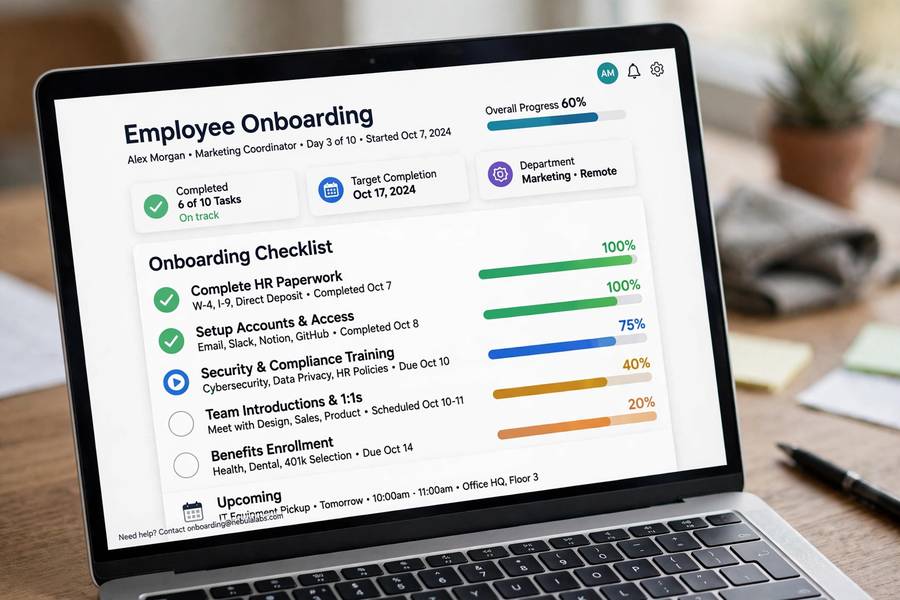
Onboarding is where AI quietly delivers some of its best HR value, because onboarding is mostly a checklist problem with a human welcome layered on top. The checklist part — account provisioning, document collection, benefits enrollment, training assignments — is ideal for automation. New hires get what they need on day one instead of day nine. HR stops chasing paperwork.
AI chatbots handle the flood of new-hire questions: where’s the HR portal, how do I enroll in benefits, what’s the Wi-Fi password, who do I ask about parking. These questions are repetitive, time-sensitive, and currently answered by busy HR staff who have answered them a hundred times. A well-trained bot answers instantly at 11 PM on the new hire’s first Sunday evening, when anxiety is highest and HR is asleep.
What automation can’t do is make someone feel welcome. The research on onboarding is clear: the human elements — a manager who shows genuine interest, a buddy who eats lunch with you the first week, a team that introduces you properly — determine whether onboarding succeeds. Use AI to clear the administrative fog so humans have time for the parts that matter. That’s the correct division of labor, and it’s the theme of every good HR AI deployment.
Answering Routine Employee Questions
Every HR team fields the same questions endlessly: how many vacation days do I have left, what’s our parental leave policy, how do I update my direct deposit, when is open enrollment. An AI assistant trained on your company’s policies and handbook can answer these instantly, 24/7, in the employee’s own words rather than handbook-ese.
The implementation details matter. The bot needs access to current policy documents, not last year’s. It needs to know its limits — when a question involves a personal situation, a dispute, or anything sensitive, it should route to a human, not improvise an answer. And it needs a feedback mechanism so wrong answers get caught and fixed. A bot that confidently cites an outdated leave policy is worse than no bot at all.
Done right, this is a massive time saver — routine questions can be 40 to 60 percent of HR’s inbound volume. Done wrong, it’s a liability generator. The difference is entirely in the training data quality and the escalation rules.
Analyzing Employee Surveys
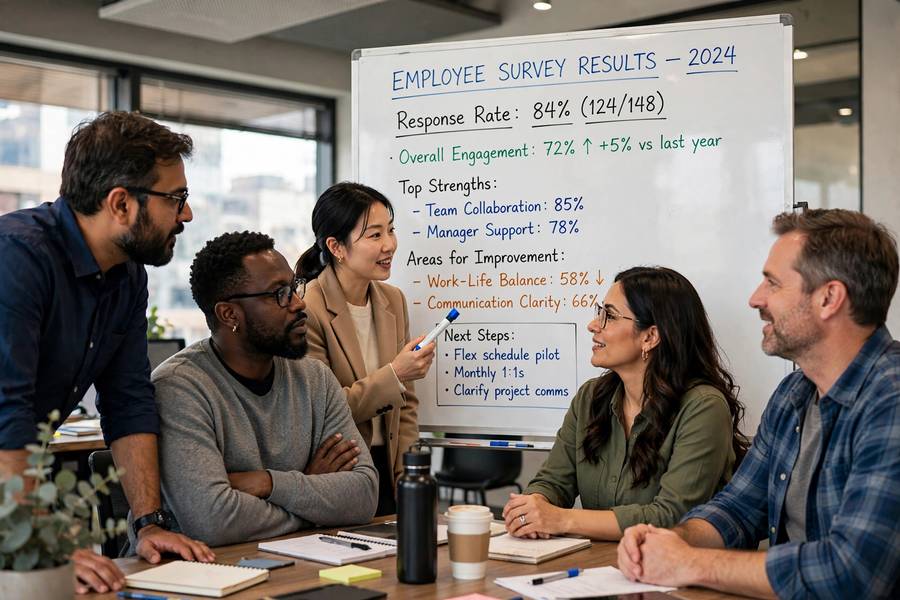
Employee engagement surveys produce thousands of open-ended comments that nobody has time to read. AI analysis turns that wall of text into themes: what people are actually complaining about, what they’re praising, how sentiment varies by department, which issues are getting worse quarter over quarter.
This is one of AI’s strongest HR use cases because the alternative is genuinely bad — either the comments go unread (wasting the survey) or someone skims a sample (missing the patterns). AI reads everything, clusters by topic, and surfaces representative quotes. Some tools track sentiment trends over time, so you can see whether that new flexible-work policy actually moved the needle.
Two cautions. First, anonymity: make sure the analysis can’t de-anonymize respondents, especially in small teams where a distinctive complaint identifies its author. Second, action: survey analysis that produces no changes is worse than no survey. If AI helps you find the problems faster, the obligation to fix them arrives faster too.
Performance Review Drafting
AI can help managers draft performance reviews by organizing scattered notes, peer feedback, and goal-tracking data into coherent drafts. For managers who supervise ten people and dread review season, this is a genuine lifeline — the blank page is the hardest part, and AI eliminates it.
But this is a high-oversight use case. Performance reviews affect compensation, promotions, and careers. AI drafts tend toward the generic and the flattering, which means unedited AI reviews produce a suspicious uniformity — everyone is “a strong contributor who consistently delivers.” Managers must add the specific examples, the honest assessments, the differentiation that makes a review meaningful. The rule: AI organizes, the manager judges.
Also consider the employee’s perspective. Discovering that your performance review was largely AI-generated feels dehumanizing, and the feeling is justified. Be transparent about the process. “I use AI to organize my notes, but every assessment is mine” is honest and preserves trust.
What to Keep Fully Human
Some HR work should never be delegated to AI, and saying so explicitly is part of a responsible AI strategy. Final hiring decisions. Terminations and layoffs — a person deserves to hear it from a person, full stop. Investigations into harassment or misconduct. Sensitive conversations about performance problems, accommodations, or personal crises. Salary negotiations.
The test is simple: would a reasonable employee feel disrespected learning that AI made or delivered this decision? If yes, keep it human. This isn’t about AI’s capability — it’s about dignity. HR is the department that most directly embodies how a company treats people, and outsourcing the human moments to software tells everyone exactly what the company values.
How to Start Safely
Start with the low-risk, high-volume use cases: job description drafting, interview scheduling, routine question answering, survey analysis. These have clear ROI, limited downside, and build organizational comfort with AI. Before touching anything that affects hiring decisions or employee evaluations, establish your AI policy — data rules, audit requirements, human-oversight mandates.
Involve legal and compliance early, especially for screening tools — employment discrimination law applies to AI-assisted decisions exactly as it applies to human ones, and regulators are increasingly specific about it. Audit continuously, not once. And keep a public list of where AI is and isn’t used in your HR processes. Transparency with employees isn’t just ethical; it’s the thing that separates the companies whose AI programs thrive from the ones that end up as cautionary tales.
For the fundamentals of workplace AI beyond HR, my guide on what AI tools are covers the landscape these use cases draw from.
Frequently Asked Questions
The strongest AI use cases in HR are job description drafting, interview scheduling, new-hire onboarding automation, answering routine employee questions, and analyzing engagement survey comments. These are high-volume, low-risk tasks where AI saves significant time with minimal downside.
AI can assist with resume screening as a first-pass filter, but final hiring decisions should stay human. Screening models can inherit bias from historical hiring data, so they need regular audits, and auto-rejection without human review is risky and potentially discriminatory.
AI can organize notes and draft structure for performance reviews, but managers must add specific examples and honest assessments. Unedited AI reviews become generic and uniform, and employees should know the process involves AI assistance with human judgment behind it.
Final hiring decisions, terminations, harassment investigations, and sensitive personal conversations should stay fully human. The test: if a reasonable employee would feel disrespected learning AI made or delivered the decision, keep it human.
Audit tool recommendations against the applicant pool for unexplained demographic differences, strip identifying information before screening where possible, never auto-reject without human review, and ask vendors how they test for bias and what training data they used.