How to Write a Blog Post Faster: A No-AI Workflow for Beginners


Here is an uncomfortable truth about blogging: most beginners do not have a writing problem; they have a process problem. They open a blank document, stare at it, write a sentence, delete it, check their phone, and three hours later have 200 words. If that sounds familiar, this guide is for you. I am going to show you how to write a blog post faster using a workflow that requires zero AI tools, zero expensive software, and zero talent you do not already have. Just a better order of operations.
I write multiple posts a week, and the system below is what lets me do it without burning out. It is built for beginners, which means no jargon and no assumptions. Fair warning: this is not about cutting corners on quality. It is about removing the friction that makes writing feel slow.
Why Writing Feels Slow (It Is Not What You Think)
Beginners almost always blame the wrong thing. They think they write slowly because they are bad writers. In reality, they write slowly because they try to do five jobs at once: researching, structuring, drafting, editing, and formatting, all in the same pass, in the same document, in the same hour. Every time your brain switches jobs, it pays a switching cost, and those costs add up to hours.
The fix is embarrassingly simple: do one job at a time, in the right order. Research first, then outline, then draft, then edit, then format. Never go backward until the current stage is done. This single change, separating drafting from editing, typically cuts writing time in half for the beginners I coach. Everything below is built on it.
Step 1: The 10-Minute Outline (Do This First, Always)
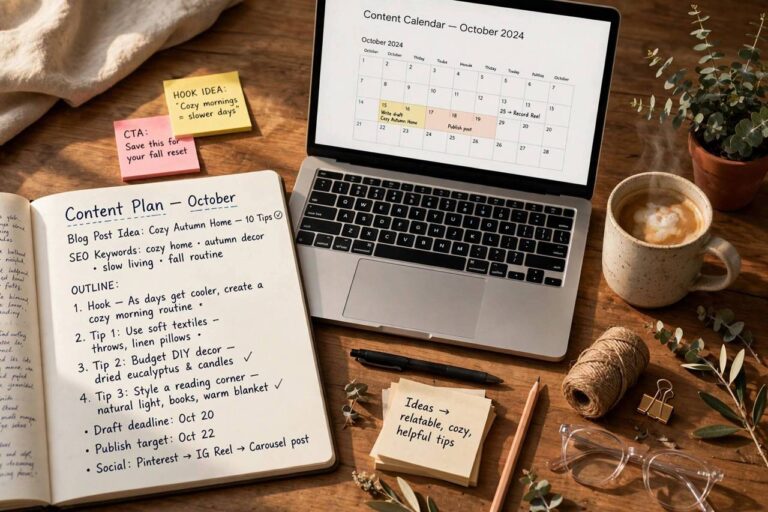
Never start with a blank page. Start with an outline, and give it exactly ten minutes. Set a timer. Write your working title at the top, then list the 3 to 5 main points your post will cover as headings. Under each heading, jot 2 to 3 bullet points of what you want to say. That is it. Ten minutes, done.
Why this works: an outline converts “write a post” (huge, scary, vague) into “write 150 words about point 2” (small, concrete, doable). It also prevents the number-one time waster in blogging: mid-draft restructuring, where you realize halfway through that your post has no logical flow and have to rebuild it. Ten minutes up front saves an hour later. I have never seen this fail.
If you get stuck on the outline, your topic is too big. Narrow it. “How to start a garden” is a book; “how to start a container herb garden on a balcony” is a post. Smaller topics outline themselves.
Step 2: Draft Ugly and Fast (Write First, Edit Later)
Now draft, following one rule: forward motion only. Write from your outline, top to bottom, without editing. Do not fix typos. Do not reword sentences. Do not look up that statistic (leave a marker like [STAT] and keep going). Do not reread what you wrote. If a section is hard, write “[fix later]” and move on.
This feels wrong the first few times. Your inner editor will scream. But here is the math: a first draft written at full speed takes 30 to 45 minutes for a standard post. A first draft written while editing takes two to three hours and is barely better, because early editing optimizes sentences you might cut anyway. Write the whole thing badly, then make it good once. Two passes, each fast, beats one pass that tries to do both.
Set a timer for 25 minutes, write without stopping, take a five-minute break, and repeat. Most posts are done in two or three of these sprints. If you blog regularly, you will also want to read about how to start a blog the right way, because a clear niche and content plan make every individual post faster to write.
Step 3: Try Dictation (The Speed Multiplier)
This is the highest-leverage trick in the guide. Most people speak at 130 to 150 words per minute and type at 40. Dictating your draft, using your phone’s voice-to-text or your computer’s built-in dictation, can triple your drafting speed overnight.
It works best if you treat it like explaining the topic to a friend. Open your outline, hit the microphone, and talk through each point. Do not worry about “umms” or perfect phrasing; you will clean those in the edit pass. The first time feels awkward. By the third post, it feels like a superpower. I dictate first drafts while walking, and the movement seems to keep the ideas flowing.
One tip: dictate in a quiet space and speak your punctuation (“comma,” “new paragraph”) until you learn your tool’s quirks. The cleanup pass handles the rest.

Step 4: Build a Personal Template Library
Notice that most of your posts follow the same few shapes: how-to guides, listicles, explainers, personal stories, comparisons. Stop rebuilding the structure every time. Create a template for each shape you use, a document with the headings, intro formula, and section order pre-filled, and start every post from the template instead of a blank page.
A basic how-to template, for example: hook intro (the problem) → what you will learn → prerequisites → steps (one H2 each) → common mistakes → FAQ → conclusion. Fill in the blanks and the post practically writes itself. After five or six posts, your templates will feel like custom tools, because they are.
Step 5: Batch Your Research
Research is where writing time goes to die, because “quick research” turns into forty open tabs. Instead, batch it: before you draft, spend 20 focused minutes gathering everything you need, links, facts, quotes, examples, into one document or note. Then close the browser and draft from your notes.
Two rules make this work. First, research with a question list, not curiosity; write down exactly what you need to find before you open a tab. Second, when you hit a gap mid-draft, mark it ([STAT], [EXAMPLE], [LINK]) and keep writing. Fill all the gaps in one batch after the draft is done. Context-switching between writing and researching is the slowest way to do both.
Step 6: The Single-Pass Edit
Edit once, with a checklist, and then ship it. Read the draft aloud (you will catch awkward phrasing your eyes skip), cut 10% (beginners overwrite; every post is better shorter), check your headings (do they tell the story on their own?), verify your facts and links, and fix the [STAT] markers you left. Then publish.
The key discipline: one pass. Beginners who edit three or four times do not produce better posts; they produce later posts. Your tenth published post will teach you more than your first post’s fourth edit ever will. Done beats perfect, and published beats polished-but-sitting-in-drafts.
How to Write a Blog Post Faster: A Realistic Time Budget
Here is what the full workflow looks like in practice for a standard 1,500-word post: outline, 10 minutes; research batch, 20 minutes; draft (two sprints), 50 minutes; gap-filling, 15 minutes; single-pass edit, 25 minutes. Total: about 2 hours. Compare that to the blank-page-stare method, which routinely eats an entire afternoon, and the value of the system is obvious. As you internalize it, 90 minutes becomes normal.
Free Tools That Speed Up Blogging (Without Writing For You)
This workflow needs no AI, but a few free tools remove friction. A timer app or your phone’s clock handles the 25-minute sprints. Your phone’s built-in voice recorder or dictation (Gboard on Android, the microphone key on iPhone keyboards, or Windows/Mac native dictation) covers the dictation step at zero cost. For research batching, a simple note app where you paste links and facts beats forty open tabs. And a free grammar checker for the single-pass edit catches the typos your tired eyes miss. None of these write for you; they just clear the path so your own writing comes out faster. The best tool is the one you will actually use consistently, so pick the simplest option in each category and ignore the rest until the workflow is habitual.
Frequently Asked Questions
How long should it take to write a blog post?
For a beginner writing a standard 1,000 to 1,500-word post, 2 to 3 hours total (including research and editing) is realistic with a good workflow. Experienced bloggers often do it in 60 to 90 minutes. If it regularly takes you 5+ hours, the bottleneck is almost always process, not talent.
Should I write every day to get faster?
Frequency helps, but consistency beats volume. Writing three posts a week on a schedule builds speed faster than sporadic binge sessions. The workflow matters more than the volume; daily writing with a bad process just reinforces the bad process.
Is dictation really faster than typing?
For most people, yes, significantly. Speaking at 130+ words per minute versus typing at 40 is simple math. The cleanup pass takes longer than with typed drafts, but the net time is still usually 30 to 50% less.
How do I stop editing while I draft?
Make it physically harder: use a distraction-free writing app, turn off your monitor’s spell-check underlines if you can, or draft in a plain text editor. The timer technique (25-minute sprints with no stopping) also helps by making forward motion the only goal.
Do templates make posts sound formulaic?
Templates structure your thinking; they do not write your sentences. Readers notice structure only when it is bad. A good template is invisible, and it frees your mental energy for the actual content, which is where your voice lives.
What is the fastest blog post format to write?
Listicles and personal experience posts, because they need minimal research and follow natural structures. In-depth guides and comparison posts take longer due to research. If you need to publish quickly, pick a format that matches what you already know.
Final Thoughts
Speed is a system, not a gift. Outline first, draft without editing, dictate when you can, template your formats, batch your research, and edit exactly once. Do that for a month and writing will feel like a different activity entirely, one you might even start to enjoy.