
The first time I asked ChatGPT something important, it gave me a confident-sounding answer that turned out to be wrong. The problem wasn’t the model — it was my question. I’d given it a vague, context-free prompt and received exactly what I’d asked for: a vague, context-free answer. Once I learned to prompt properly, the same model became one of the most useful tools in my workflow.
Here’s the honest truth nobody selling “prompt courses” wants to admit: you don’t need a hundred secret prompts. You need about ten techniques, applied consistently. This guide covers the ones I’ve actually tested over hundreds of hours — what genuinely improves answers, and what turns out to be superstition.
Table of Contents
- Why Your Answers Depend on Your Questions
- Technique 1: Give It Context Up Front
- Technique 2: Show an Example, Don’t Just Describe
- Technique 3: Assign a Role and Audience
- Technique 4: Specify Format and Length
- Technique 5: Break Complex Tasks Into Steps
- Technique 6: Iterate Like a Conversation
- Technique 7: Ask It to Show Its Reasoning
- Technique 8: Tell It What to Avoid
- Technique 9: Verify, Don’t Trust
- Technique 10: Know When Prompting Isn’t the Problem
- Frequently Asked Questions
Why Your Answers Depend on Your Questions
ChatGPT generates its answer from patterns in your prompt — the words you use shape which patterns activate. A vague prompt activates vague patterns; a specific, well-structured one pulls the model toward the precise knowledge and style you need. Understanding how ChatGPT actually works underneath helps, but you don’t need the technical details: the practical rule is simple.
Garbage in, garbage out — but also, gold in, gold out. Most bad ChatGPT answers I’ve seen trace back to prompts with missing context, no examples, or contradictory instructions. Fix the prompt and the same question gets a dramatically better answer. This guide is only about that fix.
One warning before we start: prompting can’t make the model know things it doesn’t know, and it can’t eliminate hallucinations. What it can do is maximize what you get from what the model does know.
Technique 1: Give It Context Up Front
This is the single biggest lever, and most people skip it. The model doesn’t know your situation, your constraints, or your goal. Tell it.
Weak: “Write a marketing email.”
Strong: “I’m launching a $29/month meal-planning app for busy parents. Write a 150-word launch email to my existing newsletter (8,000 subscribers, mostly moms 30–45) announcing a 7-day free trial. Tone: warm, practical, no hype.”
See the difference? The second version gives the model a subject, audience, constraints, length, and tone. Every one of those details narrows the pattern-matching toward a better answer.
What context helps most:
- Your goal — what the output is for and what “good” looks like
- Your audience — who will read it, their expertise level
- Constraints — length, format, tone, budget, tools available
- Background — the relevant facts the model can’t know
I’ve found that two sentences of context routinely beat a paragraph of clever instruction. Start here before anything else.
Technique 2: Show an Example, Don’t Just Describe
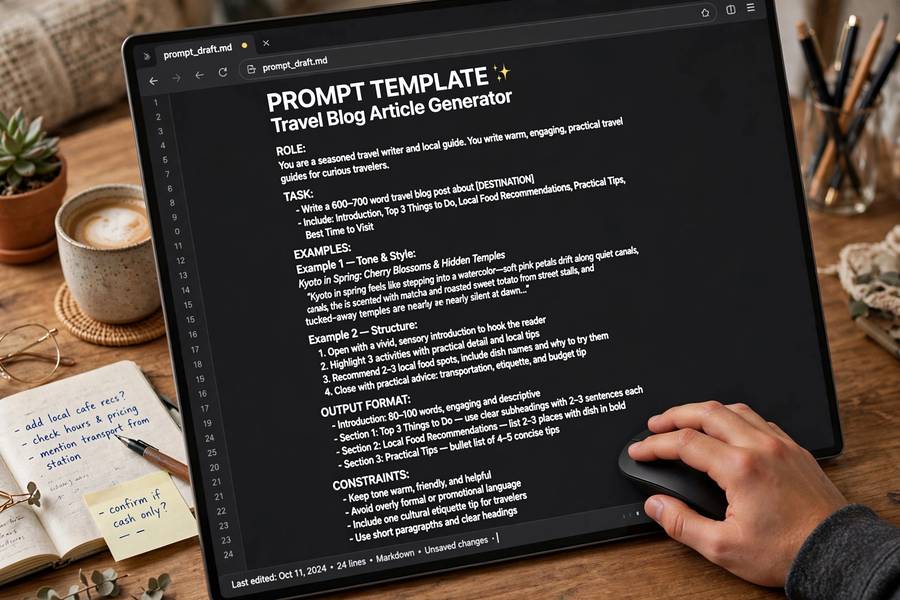
People describe what they want (“make it professional but friendly”) when showing would work better. If you have an example of the style or format you want, paste it in.
Example: “Here’s the format I want. Example of a good summary: [paste example]. Now write one for this article: [paste article].”
This works because it gives the model a concrete pattern to follow instead of an abstract instruction to interpret. “Professional but friendly” means ten different things; your example means exactly one.
When to use this: style matching, specific formats (tables, reports, emails), tone calibration, structured outputs. One good example routinely outperforms a paragraph of stylistic instruction.
Technique 3: Assign a Role and Audience
“Act as a senior tax advisor” does change outputs — not because the model becomes one, but because the role steers it toward the right register, depth, and conventions. Pair the role with the audience and it gets better.
Formula that works: “You are [role]. Explain [topic] to [audience].”
Real examples:
- “You’re a senior network engineer. Explain DNS resolution to a junior developer who knows basic networking.”
- “You’re a patient elementary teacher. Explain fractions to a 9-year-old using cooking examples.”
- “You’re a financial planner. Evaluate this budget for a single 28-year-old earning $70k — be direct about the problems.”
The honest caveat: role prompts adjust style and depth, not knowledge. “Act as a lawyer” won’t make its legal advice reliable — it just makes it sound more legal. Use roles for framing, never as a substitute for expertise. For more on what these systems can and can’t be, see my overview of what AI tools are and how they differ.
Technique 4: Specify Format and Length
The model defaults to a generic essay-like format: introduction, bullet list, conclusion. If you want something else, say so — explicitly.
Format instructions that work:
- “Answer in a table with three columns: task, time needed, difficulty.”
- “Give me the top 5, each with a one-sentence explanation.”
- “Write it as a step-by-step checklist I can print.”
- “Maximum 100 words. No preamble.”
Why this matters more than people think: unconstrained answers sprawl. The model has no sense of “enough” unless you tell it. Length limits don’t just save your reading time — they force the model to prioritize, which usually surfaces the most important points first.

Technique 5: Break Complex Tasks Into Steps
Asking for everything at once gets you a shallow answer across all fronts. Large tasks work better as sequences: get step one right, then build on it.
Example — planning a trip. Don’t ask “plan my 5-day Tokyo trip” in one shot. Instead:
- “Give me a shortlist of 8 neighborhoods to stay in, with pros and cons for a first-time visitor.”
- “I’ll pick Shinjuku. Now suggest a day-by-day itinerary.”
- “For day 2, recommend specific restaurants near our route.”
Each round narrows the context, and the model builds on decisions you’ve already made. I’ve tested both approaches repeatedly — the stepped version produces plans that are noticeably more detailed and coherent.
Bonus: this also surfaces mistakes early. If step one goes wrong, you catch it before the model builds an entire plan on a bad foundation.
Technique 6: Iterate Like a Conversation
The best answers I get are rarely the first ones. ChatGPT is built for conversation — use it that way.
Iteration prompts that work:
- “That’s too generic. Focus specifically on [X].”
- “Keep the structure but make it half as long.”
- “You missed [Y]. Add a section on that.”
- “The second paragraph is wrong because [reason]. Fix it.”
- “Give me three alternative approaches, then recommend one.”
Think of the first answer as a draft, not a deliverable. Editing instructions work exactly like they would with a human assistant: specific, direct, one change at a time. If you change everything at once, you can’t tell what actually improved.
Technique 7: Ask It to Show Its Reasoning
For analysis, planning, and decision-making tasks, answers get better when the model works through its reasoning instead of jumping to a conclusion.
Phrases that trigger this:
- “Think through this step by step before giving your final answer.”
- “Walk me through your reasoning, then give me the conclusion.”
- “Consider the main arguments for and against, then recommend.”
Why it works: it gives the model more “thinking room” — intermediate text that lets it weigh factors before committing. I’ve seen this meaningfully improve recommendations, comparisons, and troubleshooting. For simple factual questions it’s overkill; for judgment calls it’s the difference between a shrug and a considered opinion.
Technique 8: Tell It What to Avoid
People forget that instructions can be negative. Telling the model what not to do often clarifies the task more than another positive instruction.
Examples:
- “No jargon — plain language only.”
- “Don’t include history or background; I only need the action steps.”
- “Avoid generic advice; give specific, actionable recommendations.”
- “Don’t mention [competitor]; focus on our product.”
One caution: don’t overdo negative instructions. Three or four clear constraints beat a paragraph of don’ts, which the model tends to partially ignore.
Technique 9: Verify, Don’t Trust
This is the technique that prevents the expensive mistakes. ChatGPT sounds confident about things it’s wrong about. Treat every output as a draft that needs checking.
My verification workflow:
- For facts, numbers, dates, citations: verify independently. The model fabricates plausible-looking references — this is well documented, not a rare glitch.
- For advice: sanity-check against your own knowledge or a second source.
- For code: run it. Always.
- For important outputs: ask a follow-up — “Are you sure about [claim]? What evidence supports it?” This catches some errors, though not all.
Prompting techniques improve the quality of what you get; they don’t change the fundamental nature of the tool. It generates plausible text, not verified truth. Understanding how AI models are trained explains why: the model optimizes for coherent, probable responses, not factual accuracy.
Technique 10: Know When Prompting Isn’t the Problem
Sometimes no prompt fixes the answer, because the problem isn’t your prompting:
- The model doesn’t know. Cutoff dates, niche facts, very recent events — no prompt creates knowledge that isn’t there.
- The task needs tools. Real-time data, file processing, calculations beyond its scope — ChatGPT is a text model; some tasks need different software.
- You’re asking for judgment, not information. “Which should I pick?” often needs your criteria, not a better prompt — give those criteria explicitly, or accept that the decision is yours.
- The question is underspecified by nature. “Make my business better” isn’t a prompt problem; it’s a thinking problem.
Recognizing these saves you from the prompt-tweaking spiral, where you spend twenty minutes polishing a question that was never answerable in the first place.
Getting better answers from ChatGPT isn’t about secret phrases — it’s about being a clear, specific, iterative communicator. Context up front, an example when it matters, explicit format, one change at a time. I’ve tested all of these over hundreds of hours, and they’re the entire toolkit. Everything else is decoration.

Frequently Asked Questions
Vague answers almost always come from vague prompts. The model fills gaps in your instructions with generic defaults. Add context about your goal, audience, and constraints, specify the format and length you want, and the answer will sharpen up immediately.
Politeness has no measurable effect on quality. Role prompts (“act as a senior tax advisor”) do adjust style, depth, and register — they’re genuinely useful for framing — but they don’t add knowledge or make advice more reliable. Use them for tone and structure, not authority.
No. Prompting improves relevance and structure, but it can’t eliminate hallucinations — the model generates plausible text rather than retrieving verified facts. Always verify facts, numbers, dates, and citations independently, especially for anything important.
Give context up front. Tell the model your goal, your audience, your constraints, and the relevant background in two or three sentences. That single change — from “write a marketing email” to a fully specified brief — improves answers more than any other technique.
Several small ones, in sequence. Breaking complex tasks into steps produces more detailed, coherent results than asking for everything at once. Get each step right, then build on it — and you catch mistakes early instead of finding them buried in a massive answer.