Every AI chatbot you’ve used has a secret limitation: it can only “see” a certain amount of text at once. That limit is called the context window, and it explains a huge number of AI behaviors that otherwise seem mysterious — why long conversations go off the rails, why the AI forgets what you said 20 messages ago, and why pasting a whole book into the chat doesn’t work the way you’d hope.
I’ve hit this limit more times than I can count while testing AI tools. Let me explain what it actually is, why it exists, and how to work around it.
Table of Contents
- The Short Answer
- What “Context” Actually Means
- Tokens: The Unit Everything Is Measured In
- How Big Are Context Windows Today
- What Happens When the Window Fills Up
- Why Context Windows Are Limited
- The “Lost in the Middle” Problem
- Practical Ways to Work Within the Limit
- Frequently Asked Questions
The Short Answer
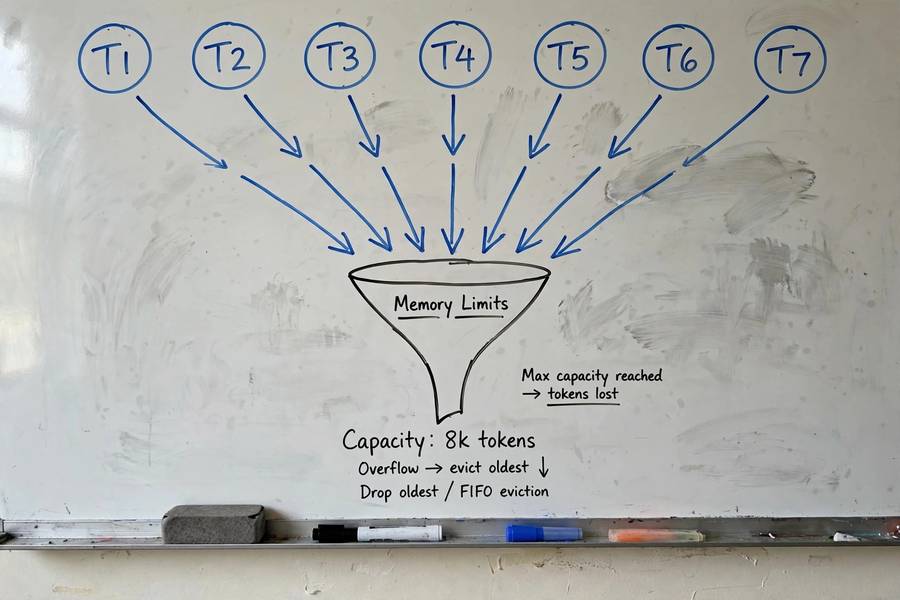
A context window is the maximum amount of text (measured in tokens) an AI model can consider at one time. It includes your current message, the conversation history, and any documents you’ve shared. When the total exceeds the limit, the oldest content gets dropped — which is why AI “forgets” things in long conversations.
Think of it as the AI’s working memory, or the size of its desk. A bigger desk means more papers visible at once. But even the biggest desk has edges, and papers that fall off are gone.
What “Context” Actually Means
When you send a message to an AI, the model doesn’t just look at that message. It looks at the context: everything relevant it needs to generate a good response. That typically includes:
- System instructions — hidden directions telling the model how to behave (“you are a helpful assistant…”)
- Conversation history — your earlier messages and its earlier replies
- Attached documents — files, pasted text, web pages you’ve shared
- Tool outputs — results from any tools the AI called (search results, code output)
All of this gets packed into the context window before the model generates its response. Every single response the AI gives you is generated from scratch based on this full package — the model doesn’t “remember” anything between messages except what’s in the window.
This is the single most important thing to understand about how AI chat works. The AI isn’t a mind that accumulates knowledge of you. It’s a brilliant improviser that re-reads the script before every line.
Tokens: The Unit Everything Is Measured In
Context windows are measured in tokens, not words. A token is a chunk of text — roughly ¾ of a word in English. So:
- “Hello world” → about 2-3 tokens
- A typical sentence → 15-25 tokens
- A page of a book → about 500 tokens
- This article → roughly 2,000 tokens
Tokenization (splitting text into tokens) is part of the pipeline I describe in my piece on how AI models are trained. The short version: common words are often single tokens, rare words get split into pieces, and different languages tokenize very differently (which is one reason AI works better in English than in some other languages).
When a product says “128K context window,” it means 128,000 tokens — roughly 96,000 English words, or about a 300-page book.
How Big Are Context Windows Today
The numbers have grown absurdly fast:
- Early models (2020-2022): 2K-8K tokens. A few pages. Conversations went sideways fast.
- Mid-era (2023): 32K-100K tokens. Dozens of pages. Usable for real document work.
- Current flagships: 128K to 1M+ tokens. Entire books, codebases, hours of transcripts.
A million-token window sounds like the problem is solved. It isn’t, for reasons I’ll get to. But first, the practical question:

What Happens When the Window Fills Up
Different systems handle overflow differently, but the common approaches are:
Truncation (oldest first). The simplest: drop the oldest messages to make room. This is why the AI “forgets” the beginning of long conversations. Your first message — the one with your actual instructions — is often the first casualty.
Summarization. Some systems compress old conversation into a summary and keep that instead. Better than dropping, but summaries lose details, and errors in the summary compound.
Sliding window with retrieval. Advanced setups keep recent messages plus retrieve relevant older bits on demand. This is how some long-document tools work — they don’t actually hold the whole document, they search it.
Hard stop. Some tools just refuse: “conversation too long, please start a new chat.” Annoying but honest.
Here’s what this means for you practically: in a long conversation, the AI is literally not seeing your early messages anymore. If it starts ignoring instructions you gave at the start, that’s probably why — not defiance, just amnesia.
Why Context Windows Are Limited
Why not just make the window infinite? Two reasons:
Compute cost. The attention mechanism at the heart of these models gets dramatically more expensive as context grows — roughly quadratically. Doubling the window more than doubles the cost. A million-token window is a flex that costs real money per query.
Quality degradation. This is the less obvious one. Bigger windows don’t just cost more — the model gets worse at using the information. Which brings us to…
The “Lost in the Middle” Problem
Here’s something researchers discovered that surprised everyone: models pay most attention to the beginning and end of their context window, and relatively less to the middle. It’s called the “lost in the middle” phenomenon, and it’s remarkably consistent.
Practical implications: – Put your most important instructions at the start of your message or conversation – Put the specific question or task at the end – Don’t bury critical details in the middle of a 50-page paste
I test this regularly and it holds up: the same information placed at the start vs. the middle of a long context gets treated very differently. It’s one of those small tricks that makes a big difference.
Practical Ways to Work Within the Limit
Now the useful part — how to actually deal with this:
1. Start fresh chats for new topics. Don’t carry a 200-message conversation across five different tasks. Each new task deserves a clean window.
2. Summarize and restart. For long projects, periodically ask the AI to summarize the key decisions and context, then start a new chat with that summary. You keep the signal, drop the noise.
3. Feed documents in chunks. Instead of pasting a whole report, share the relevant section. If you need the whole thing analyzed, ask section-by-section, then ask for synthesis.
4. Repeat critical instructions. If something matters — your role, constraints, format requirements — restate it periodically in long conversations. Don’t assume it’s still in the window.
5. Use the end of messages for the ask. Structure long prompts as: context first, instructions second, the actual question last. This fights the lost-in-the-middle effect.
6. Check what’s actually there. If the AI seems to have forgotten something, don’t argue — just re-paste it. You’re not dealing with a mind; you’re dealing with a window. (Different AI tools handle window size very differently, so this matters more in some apps than others.)
Frequently Asked Questions
A context window is the maximum amount of text (measured in tokens) an AI model can consider at one time. It includes your message, conversation history, shared documents, and tool outputs. When the total exceeds the limit, the oldest content gets dropped — which is why AI forgets things in long conversations.
Roughly 96,000 English words — about a 300-page book. A token is about three-quarters of a word in English, so 128,000 tokens converts to approximately 96,000 words. Different languages tokenize differently, so the word count varies.
Because of the context window limit. When conversation history plus new messages exceed the window, the system drops the oldest content — often your earliest instructions. The AI isn’t being difficult; it literally can no longer see those messages. Starting a fresh chat or re-pasting key instructions fixes it.
Research shows AI models pay most attention to the beginning and end of their context window and less to the middle. Information buried in the middle of a long document or conversation gets underweighted. The fix: put key instructions at the start and your actual question at the end.
You can’t expand the window yourself, but you can work within it: start fresh chats per topic, periodically summarize and restart long projects, feed documents in chunks, repeat critical instructions, and use tools with retrieval features that search documents rather than holding them entirely in context.
Not automatically. Bigger windows cost much more compute (roughly quadratically) and models get worse at using information as windows grow — the lost-in-the-middle effect. A huge window with poor information placement can underperform a smaller, well-managed one.