
Two settings, similar names, endlessly confused: “context window” and “max tokens.” I’ve watched developers mix them up in API configurations, users misunderstand them in product settings, and tutorials use them interchangeably (incorrectly). The confusion is understandable — both involve tokens, both constrain the model — but they control completely different things, and misunderstanding the difference leads to real problems: truncated outputs, wasted money, mysterious errors.
This guide draws the line clearly: what each one is, how they interact, and the practical mistakes to avoid. For the deeper concept, see what a context window is.
Table of Contents
- The Short Version
- Context Window: The Total Budget
- Max Tokens: The Output Cap
- How They Interact: The Arithmetic
- Common Confusions and Their Costs
- Setting Max Tokens: Practical Guidance
- Where You Encounter Each Setting
- The Truncation Problem
- A Worked Example: Debugging a Real “Context Length Exceeded” Error
- Frequently Asked Questions
The Short Version
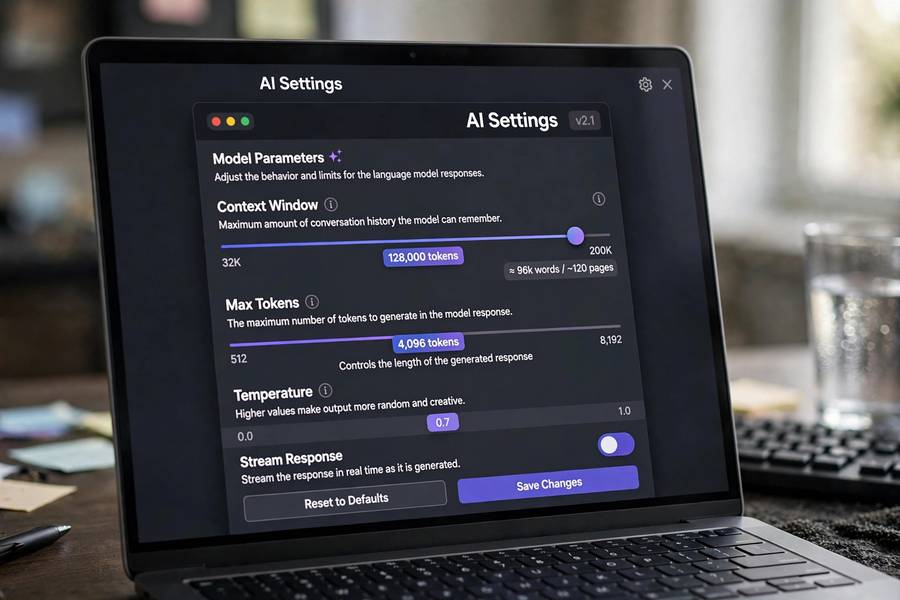
Context window = the model’s total capacity per request (input + output combined). Fixed by the model — you can’t change it, only choose models with bigger ones.
Max tokens = how many tokens the model is allowed to GENERATE in its response. Configurable per request — you (or the application) set it.
The analogy: the context window is the size of the whiteboard; max tokens is how much of it you’re allowed to use for your answer. The whiteboard’s size is fixed; your writing limit is a choice.
They’re related (output must fit within the window) but distinct (one is capacity, the other is a setting). Confusing them causes the problems below.
Context Window: The Total Budget
The context window is the model’s architectural limit — the maximum tokens it can process in a single forward pass. It covers EVERYTHING in the request:
- System instructions
- Conversation history
- Retrieved documents (in RAG)
- Your current message
- The response being generated
Key properties:
Fixed per model. GPT-4’s window is what it is; you can’t configure it larger. Your only lever is choosing a different model.
Shared resource. Input and output compete for the same budget. This is the crucial interaction — every input token is a token unavailable for output.
Invisible consumption. System prompts and formatting consume window silently. The “128K” on the spec sheet isn’t 128K available to you — it’s 128K total including everything the system adds.
The hard wall. Exceed it and the request fails (or gets truncated, depending on the implementation). There’s no graceful degradation — it’s a cliff.
Think of it as the model’s working memory capacity: finite, shared, and architecturally determined. Understanding how ChatGPT works as a system shows where these limits bite in real products.
Max Tokens: The Output Cap
Max tokens (sometimes called max_completion_tokens, max_output_tokens, or similar) limits how many tokens the model generates before stopping. It’s a per-request setting, not a model property.
What it controls:
Response length. The obvious one — capping output length. Set 500, get at most ~375 words.
Cost control. You pay per output token (usually at higher rates than input). Max tokens is your spending limit per response.
Latency control. Longer outputs take longer. Capping tokens caps waiting time.
Behavioral shaping. Short caps force concision; the model prioritizes differently when it knows space is limited.
What it does NOT control: input size, total request size, or the context window. It’s purely about generation length. Setting max_tokens=1000 doesn’t give you 1000 tokens of input capacity — it only limits the output.
Default values vary by platform — some default to generous (the model’s max output), others to conservative limits. Know your platform’s default; it’s the invisible setting shaping your experience.
How They Interact: The Arithmetic
The relationship, precisely:
max_tokens ≤ context_window − input_tokens
The model’s output can’t exceed the remaining window after input. If your input is 120K tokens in a 128K window, the maximum possible output is 8K — regardless of your max_tokens setting. The setting can only further restrict, never expand.
Practical scenarios:
Large input, default max_tokens: input 100K, window 128K, max_tokens default (say 4K). Output capped at 4K by the setting, though 28K of window remains. You’re leaving capacity unused — fine if you want short answers.
Large input, high max_tokens: input 120K, window 128K, max_tokens 50K. The setting allows 50K, but only ~8K of window remains. Output stops at ~8K (or the request errors, depending on implementation). The setting promised what the window couldn’t deliver.
Small input, low max_tokens: input 1K, window 128K, max_tokens 500. Plenty of window; output capped at 500 by choice. The common case for concise answers.
The takeaway: max_tokens is a cap within the window’s remaining space, not an independent allocation. Always consider both numbers together.
Common Confusions and Their Costs
“I set max_tokens high but got a short answer.” The model stopped because it was done, not because of the cap. Max tokens is a ceiling, not a target. (If you want longer outputs, ask for more content, not just a higher cap.)
“I set max_tokens to 128K for a long document.” The setting can’t exceed available window. With substantial input, most of that 128K is already consumed. The effective limit is window minus input.
“More max_tokens = better answers.” No — it just permits longer ones. Quality comes from the prompt and context, not the cap. Excessively high caps on simple questions waste money if the model rambles.
“The API rejected my request.” Often: input + max_tokens exceeded the window. The API validates that input_tokens + max_tokens ≤ window. Reduce input or the cap.
“Outputs cut off mid-sentence.” Max tokens hit mid-generation. The model stops exactly at the cap, even mid-word. If this happens regularly, raise the cap or request more concise outputs.
Cost surprises. Forgetting that output tokens cost more than input tokens, then setting huge max_tokens on bulk jobs. The cap is a financial control — treat it as one.
Setting Max Tokens: Practical Guidance
For chat applications: moderate caps (1–2K) for conversational use. Enough for substantive answers, prevents runaway costs from verbose models.
For summarization: cap proportional to desired summary length, not input length. Summarizing 50K tokens into 500? Set max_tokens ~700 and say “concise.”
For long-form generation: high caps (4–8K+) with clear instructions about length. But also: consider generating in sections rather than one massive output — quality often improves.
For classification/extraction: tiny caps (50–200). You want a label or a value, not an essay. Small caps also reduce hallucination room.
For agents: generous caps — agents need room to think (chain-of-thought) and act. Constraining too tightly cripples them.
The golden rule: set max_tokens based on what the task needs, not the window size. The window is the ceiling; the task determines the setting. And always leave headroom — input can grow unexpectedly (conversation history accumulates), and a cap that fit yesterday may not fit today.
Where You Encounter Each Setting
API users see both explicitly: model selection determines the window; max_tokens/max_completion_tokens is a request parameter. This is where the distinction matters most — misconfiguration here causes real errors.
Chat product users rarely see either directly. The product manages windows (truncation, summarization) and sets output limits internally. But understanding the concepts explains behaviors: why long conversations degrade, why outputs sometimes cut off, why “regenerate” with the same prompt can differ.
Developers building AI features must manage both: choosing models with adequate windows for the use case, setting max_tokens per feature based on needs and economics, handling the window-full conditions gracefully.
The product design implication: good AI products hide this complexity but respect it — managing context invisibly, setting sensible output defaults, degrading gracefully. When products feel “dumb” about long inputs, it’s often window mismanagement, not model incapability.
The Truncation Problem
The ugliest interaction: when max_tokens cuts output mid-thought. The model doesn’t know it’s about to hit the cap — it generates naturally and stops dead. Results:
- Mid-sentence cutoffs (“The key insight is that the market will—”)
- Incomplete lists (item 4 of 7, then silence)
- Broken formatting (unclosed markdown, half a table)
- Worse: the model sometimes “rushes” if it senses length pressure — degrading quality to fit
Prevention: set caps generously above expected needs; request structured outputs that complete naturally; for critical long outputs, generate in sections.
Detection: check output for completeness — does it end naturally? Automated systems should validate (ends with punctuation? complete structure?).
Recovery: “continue” prompts work but produce seams. Better to prevent than repair.
The truncation problem is the most visible sign of the window/cap confusion — and the easiest to prevent once you understand the mechanics.
A Worked Example: Debugging a Real “Context Length Exceeded” Error
Here’s one I’ve actually debugged. Setup: 128K window, RAG pipeline, max_tokens set to 8,000. Requests start failing with “maximum context length exceeded.” The confusion: input was only ~124,000 tokens — under 128K. So why the error?
The API validates input_tokens + max_tokens against the window: 124,000 + 8,000 = 132,000 > 131,072 (128K in tokens). The request is rejected not because the input doesn’t fit, but because the input plus the reserved output doesn’t.
Two fixes, and the arithmetic picks between them. Option A: trim retrieval from ~124K to ~120K tokens (drop the lowest-relevance chunks) — keeps the 8K output cap. Option B: lower max_tokens to 4,000 — 124,000 + 4,000 fits, but long answers now risk truncation. I chose A: the dropped chunks were low-relevance anyway, and the output cap was load-bearing for the summary task.
The general lesson: when this error hits, don’t just shrink things randomly — do the addition, find which term is negotiable, and cut there.

Frequently Asked Questions
Context window is the model’s fixed total capacity (input + output combined) — you can’t change it. Max tokens is a configurable cap on how many tokens the model generates in its response. Output must fit within the remaining window after input.
No — max tokens only limits generated output. It doesn’t change input capacity or the context window. However, input + max_tokens together can’t exceed the window, so large inputs effectively reduce the maximum achievable output.
The max tokens cap was reached mid-generation — the model stops exactly at the cap, even mid-word. Raise the cap, request more concise outputs, or generate long content in sections rather than one massive output.
No. Set it based on what the task needs — it’s a ceiling, not a quality control. Excessively high caps waste money if the model rambles, and can’t exceed the window’s remaining space anyway. Match the cap to the task: tiny for classification, moderate for chat, generous for long-form.
Usually output tokens cost more — often 2–4x input rates. This makes max tokens a financial control as well as a length control. For bulk applications, right-sizing max tokens is a meaningful cost optimization.