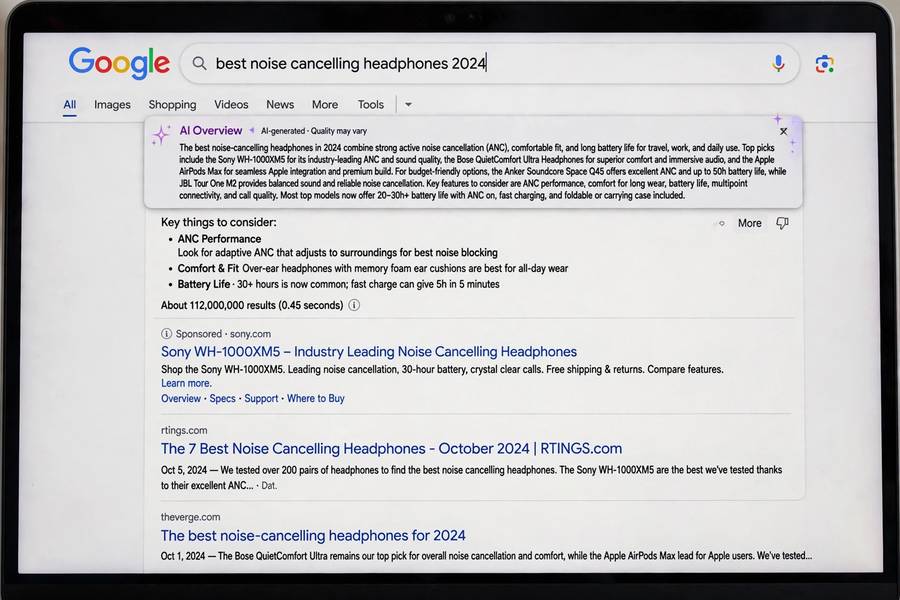
The first time Google put an AI-written paragraph at the top of my search results, I had two reactions in quick succession: “oh, that’s handy” and “wait, when did this happen?” It happened gradually — an experiment here, an expansion there — until one day the thing I’d used the same way for twenty years worked differently, and nobody had asked my permission. That’s Google AI Mode: the biggest change to search since the search box itself, delivered as a fait accompli.
If you’ve seen those AI Overviews sitting above the familiar blue links and wondered what they are, how they work, and whether to trust them, this guide is for you. Plain English, no hype. For the wider context, see what AI search is.
Table of Contents
- The Short Answer
- What You Actually See
- How It Works Under the Hood
- AI Mode vs AI Overviews: What’s the Difference
- What It’s Good At
- Where It Goes Wrong
- How to Use It Well
- Can You Turn It Off
- What It Means for the Web
- Frequently Asked Questions

The Short Answer
Google AI Mode is Google’s AI-powered search experience: instead of (or alongside) the traditional list of links, Google’s AI reads relevant pages and writes a direct answer to your question, displayed at the top of the results with links to the sources it used.
Think of it as Google hiring a very fast research assistant to pre-read the results for you. You ask “why is the sky blue,” and instead of ten links about atmospheric physics, you get a three-paragraph explanation with citations — plus the ten links below if you want them.
It runs on Google’s Gemini models, draws on Google’s web index (the largest and freshest in existence), and it’s rolling out to more queries and more countries steadily. Whether you opted in or not, if you use Google, you’re using it.
What You Actually See
The experience has two main forms, and the distinction matters:
AI Overviews appear automatically at the top of regular search results for many queries. You search normally; Google decides your query deserves an AI summary and shows one. It’s the default experience now for a large share of informational searches — you don’t choose it, it chooses you.
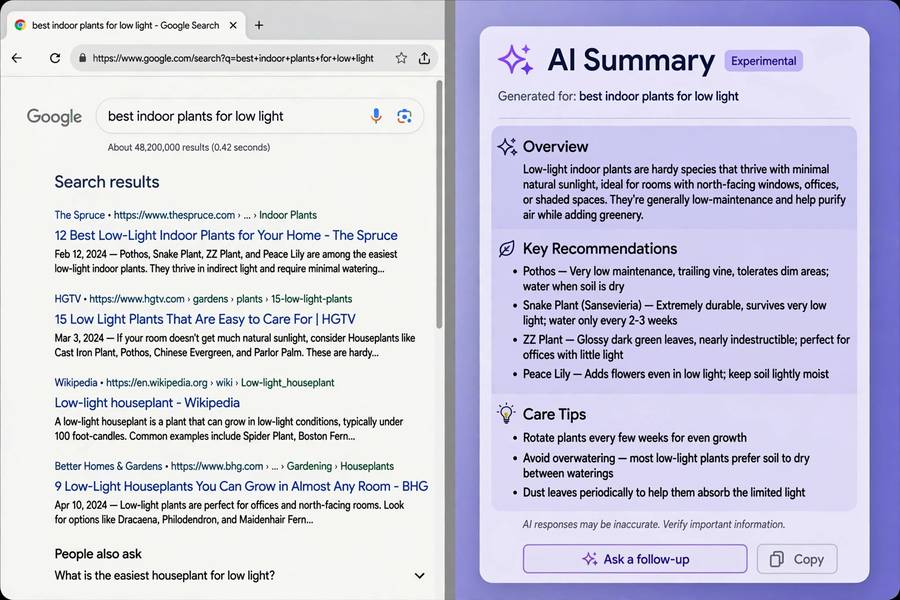
AI Mode is the dedicated mode — a separate tab or toggle where the entire search experience is conversational and AI-first. Ask follow-ups, refine, go deeper; the interface behaves more like a chatbot built on Google’s index. This is Google’s answer to Perplexity and ChatGPT’s search features, and it’s where the company is clearly heading.
Visually, both show the same anatomy: a generated answer in natural prose, inline citation links to source pages, sometimes images or data pulled from the knowledge graph, and follow-up question suggestions. Below it all, the traditional results persist — Google hasn’t removed the blue links, just demoted them.
How It Works Under the Hood
The pipeline, simplified:
1. Query understanding. Gemini interprets your query — including the messy, conversational kind people actually type. It’s notably better than old keyword matching at grasping intent, which is why “that thing where my phone battery dies fast in winter” now returns something useful.
2. Retrieval. Google searches its index as always — this is still, underneath, the classic machinery of how a search engine works: crawling, indexing, ranking. AI Mode doesn’t replace the index; it reads from it.
3. Multi-step reasoning. For complex queries, the system breaks the question into sub-questions, searches each, and synthesizes. “Plan a 3-day Tokyo itinerary under $500” becomes searches for flights, neighborhoods, food costs, transit — then one composed answer. This fan-out is the genuinely new capability.
4. Generation with grounding. Gemini writes the answer constrained by the retrieved documents, with citations attached. “Grounded” is Google’s term for “we tried to keep it tied to sources” — tried being the operative word.
5. Safety filtering. An additional layer screens for harmful, misleading, or low-confidence content. This is why AI Overviews sometimes decline to answer, or answer with heavy hedging — the filter caught something.
The whole thing runs in seconds. The engineering is genuinely impressive, which makes the failure modes — covered below — all the more instructive about the technology’s limits.
AI Mode vs AI Overviews: What’s the Difference
People conflate these, so let’s be precise:
| AI Overviews | AI Mode | |
|---|---|---|
| Trigger | Automatic, Google decides | You choose it (tab/toggle) |
| Experience | Summary atop normal results | Full conversational interface |
| Follow-ups | Limited | Full multi-turn conversation |
| Best for | Quick answers in normal search | Research sessions, complex queries |
In practice, AI Overviews are the ambient version — AI search as a feature of search. AI Mode is the destination version — AI search as the product. Google’s strategy is clearly to make the ambient version ubiquitous and the destination version compelling enough to keep you from opening a competitor’s tab.
Expect the line to blur further. The direction of travel is one Google where “search” and “AI Mode” are just… search.

What It’s Good At
Credit where due — several things work genuinely well:
Instant answers to factual questions. “How tall is the Burj Khalifa,” “when did the Roman Empire fall,” “what’s the capital of Burkina Faso” — fast, correct, cited. The bread and butter, done well.
Multi-part questions. The fan-out reasoning handles questions that old search fumbled: “compare these three phones for photography under $800” or “what do I need to know before hiking the Inca Trail.” One query, synthesized answer, sources for each part.
Freshness. Google’s index is recrawled constantly, so AI Mode handles “what happened today” better than chatbot-first competitors working from training data. For breaking news and live information, this is a real edge.
Zero learning curve. It’s in the search box you already use. Your parents will use AI Mode without knowing it’s called AI Mode, which is arguably the point — the technology disappears into the habit.
Where It Goes Wrong
Now the honest part. Google’s AI search has produced some spectacular public failures, and the patterns are instructive:
Confident nonsense on thin topics. The infamous early examples — glue on pizza, rocks as nutrition — came from the system treating joke or low-quality sources (a Reddit shitpost, an Onion article) as legitimate inputs. Retrieval found them, generation trusted them, and the answer went out with Google’s authority behind it. The filtering has improved since, but the structural vulnerability — garbage in, gospel out — remains.
Over-answering. Sometimes it generates an AI overview for queries where no summary is needed, or where the correct answer is “it depends” and the overview picks one side. The system is biased toward answering rather than abstaining, because engagement metrics reward answers.
Citation theater. The little links look authoritative, but as with all AI search, the citation may not actually support the claim. Google’s scale doesn’t exempt it from the generation-attribution gap — it just means the gap affects more people.
The consensus machine. AI Mode smooths toward the average view. For topics with legitimate debate, you get the median opinion presented as the answer. The blue links below still contain the debate, but fewer people scroll now.
None of this makes it unusable — it makes it a tool that requires the same verification habits as every AI search product. Speed is not accuracy.
How to Use It Well
Practical advice for getting the most out of it:
Read the overview, then scroll. The AI summary is the first pass, not the last word. The traditional results below it are still there — use them for anything that matters. This two-layer reading takes ten extra seconds and catches most errors.
Click the citations. Especially for numbers, dates, and claims you’ll repeat. The citation takes you to the source; the source tells you whether the claim survives contact with reality.
Ask follow-ups in AI Mode for complex topics. The conversational mode is meaningfully better than one-shot overviews for anything multi-part. “Explain that more simply” and “what about the cost” are free — use them.
Rephrase when the answer feels off. If the overview seems wrong or weirdly confident about something contested, try the query with different words. Different phrasing retrieves different sources, and the answer can change substantially.
Know when to skip it. For opinions, debates, shopping decisions with real tradeoffs, or anything where you want to see the range of views — go straight to the links. The overview is a consensus product; sometimes you don’t want the consensus.
Can You Turn It Off
The question everyone asks. The honest answer: partially, and Google keeps moving the furniture.
There have been various toggles, “Web” filter tabs, and settings that reduce AI Overviews, but Google treats AI answers as the future of the product, not an optional feature. Workarounds exist — the Web filter shows classic results, some browser extensions strip the overviews — but they’re workarounds, not supported choices.
My take: rather than fighting to disable it, learn to read it critically. It’s not going away, and the skill of using AI answers well — fast first pass, verify what matters — transfers to every AI search tool you’ll ever use. The off switch that matters is in your head: the habit of not treating a generated paragraph as gospel.
What It Means for the Web
The bigger picture, briefly: AI Mode changes the economics of the web. When Google answers the question directly, fewer people click through to publishers — the sites whose content trained and feeds the answers. This is the existential tension in search right now: the better AI answers get, the less traffic flows to the sources they’re built on.
Google’s answer is that citations and links still send traffic, and that new formats will emerge. Publishers’ answer is that “some traffic” isn’t a business model. The outcome will shape what the web looks like in five years — whether independent sites survive, whether AI answers cite a diverse web or a hollowed-out one.
As a user, the practical implication is worth noting: the sources AI Mode cites are the web’s remaining incentive to publish. Clicking through occasionally isn’t just verification — it’s a small vote for keeping the sources alive.
Frequently Asked Questions
Google AI Mode is Google’s AI-powered search experience where Gemini reads relevant web pages and writes a direct answer with citations, shown above or instead of traditional results. AI Overviews appear automatically in normal search; AI Mode is the dedicated conversational version.
Usually, for straightforward factual questions — it draws on Google’s fresh index and cites sources. But it can confidently present wrong answers, especially on thin or contested topics, and citations don’t always support the claims. Treat the overview as a first pass and verify anything important.
AI Mode is a search product built on Google’s live web index — it’s optimized for finding current information with sources. ChatGPT is a conversational AI optimized for dialogue and multi-step tasks, with web browsing as an add-on. For facts with citations use AI Mode; for thinking through complex problems conversationally, ChatGPT’s approach (explained in [how ChatGPT works](https://www.wedlockcross.com/how-does-chatgpt-work/)) often fits better.
There’s no permanent official off switch — Google treats AI answers as core to search now. The Web filter tab shows classic link results, and browser extensions can hide overviews, but these are workarounds. Learning to read AI answers critically is the more durable skill.
It reduces click-through to publishers, since many users get their answer from the overview without visiting sources. This is an ongoing industry tension. Clicking citations when a source was genuinely useful is both good verification practice and a small way to support the sites behind the answers.