I used to be the person frantically typing through every meeting — half-listening, half-transcribing, fully missing the actual conversation. My notes were verbatim garbage: everything said, nothing understood. Then I let an AI notetaker into my calls, and the change was embarrassing in retrospect. Freed from typing, I started actually participating. My contributions improved. My notes — now AI-generated — improved more.
That was two years ago, and the tools have gotten dramatically better since. This guide is the complete workflow: choosing a tool, running it well, turning transcripts into genuinely useful notes, handling the privacy questions, and the review step that separates people who benefit from AI notes from people who just accumulate them. The broader context: how to use AI at work.
Table of Contents
- Why AI Notes Beat Human Notes (Usually)
- Choosing Your Notetaker
- Before the Meeting: Setup That Matters
- During the Meeting: Let It Work (and Actually Listen)
- After the Meeting: The Workflow That Matters
- The Prompts That Produce Useful Notes
- Privacy, Consent, and the Recording Question
- The Review Step (Don’t Skip This)
- Common Mistakes
- Frequently Asked Questions
Why AI Notes Beat Human Notes (Usually)
Human note-taking during meetings has a fundamental flaw: attention is zero-sum. Every unit of attention spent transcribing is a unit not spent understanding, questioning, or contributing. The result is notes that are comprehensive and useless — a transcript of words without a grasp of meaning.
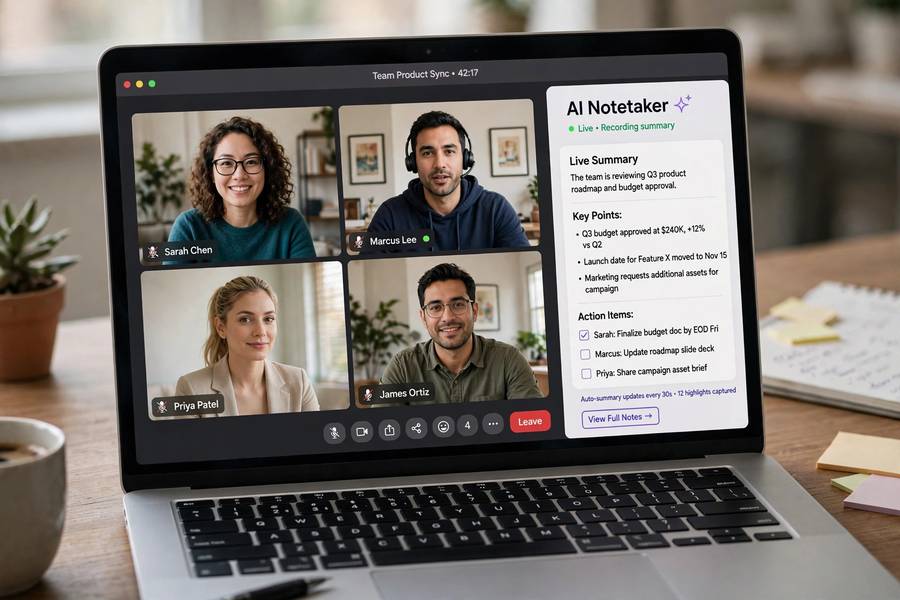
AI notetakers invert this. The machine handles capture (transcription — tireless, verbatim, timestamped) and first-pass synthesis (summary, action items, key decisions). The human handles what humans are actually good at: understanding context, reading the room, asking the question that changes the discussion.
The division of labor is clean: AI captures everything, you comprehend everything. My meeting notes went from “everything said, nothing understood” to “everything captured, key points distilled” — and I finally started being present in the room instead of buried in my keyboard.
The caveat, which I’ll develop below: AI captures words, not meaning-between-words. The sarcasm, the hesitation, the thing everyone understood but nobody said — that’s still on you. The best meeting notes are AI capture plus human annotation, not AI output alone.
Choosing Your Notetaker
The landscape, honestly assessed:
Dedicated notetakers (Otter.ai, Fireflies.ai, Fathom). The specialists. They join calls as participants, transcribe in real time, and generate summaries with action items, key topics, and speaker identification. Fathom’s summaries are the best I’ve used for standard business meetings; Otter has the most mature search across your meeting history; Fireflies integrates widest. All handle the major platforms (Zoom, Meet, Teams).
Built-in options (Teams Premium/Co-pilot, Zoom AI Companion, Google Meet’s Take notes for me). The advantage is integration — no extra bot joining, no separate app, data stays in your ecosystem. The quality is now competitive with the specialists for transcription; summaries are slightly more generic. If your company is standardized on one platform, start here — the friction is lowest.
What actually differentiates them: summary quality on messy meetings (the specialists edge ahead), search across history (Otter leads), CRM/project integrations (Fireflies leads), and data handling (built-ins win for regulated industries). For most users, any of them is fine — the workflow matters more than the tool. (For non-AI capture options, best note-taking apps covers the field.)
My recommendation: start with whatever’s built into your company’s platform. Add a specialist only if the built-in summaries disappoint you on real meetings. Don’t overthink the choice; overthink the workflow.
Before the Meeting: Setup That Matters
Five minutes of prep transforms AI notes from generic to genuinely useful:
Set the agenda in the tool. Most notetakers let you add context — the meeting purpose, key questions, attendees. This focuses the summary: instead of “here’s everything discussed,” you get “here’s what was decided about the launch timeline.” Context in, relevance out.
Check the tech. Test microphone levels, confirm the notetaker is invited (calendar integration usually handles this), and verify recording consent settings. The meeting where the notetaker fails to join is the meeting you needed it most — Murphy’s law applies.
Prepare your annotation mindset. Decide in advance what you’ll capture manually: decisions that need your judgment call noted, political dynamics, things said that shouldn’t be in the shared notes. The AI handles the what; you handle the so-what.
For recurring meetings, create a template: standing sections (decisions, action items, blockers, next steps) that the AI fills each time. Consistency across weeks makes the notes searchable and comparable — you can ask “what did we decide about X three weeks ago?” and get an answer.
During the Meeting: Let It Work (and Actually Listen)
The discipline now: stop typing, start thinking.
Be present. This is the whole point. Listen actively, watch faces (or video tiles), notice what’s not being said. Ask questions. Challenge assumptions. The notes are handled — your job is the conversation.
Speak clearly for the transcript. Say names when addressing people (“Sarah, what’s your take?”), restate key decisions aloud (“so we’re agreed: launch moves to March”), and spell out unusual terms once. You’re narrating for the transcript, and it dramatically improves summary quality.
Bookmark key moments. Most tools let you highlight or bookmark during the call. When something important happens — a decision, a commitment, a disagreement — mark it. These bookmarks become the skeleton of your reviewed notes.
Note what the AI can’t. The room’s reaction to the proposal. Who went quiet. What was decided in the side conversation. The emotional temperature. Jot these as brief private annotations — three or four lines per meeting is enough. This is the human layer no AI captures.
Don’t narrate the AI. Resist the urge to say “notetaker, please note that…” — it’s awkward, and modern tools don’t need it. Just run a good meeting; the capture handles itself.
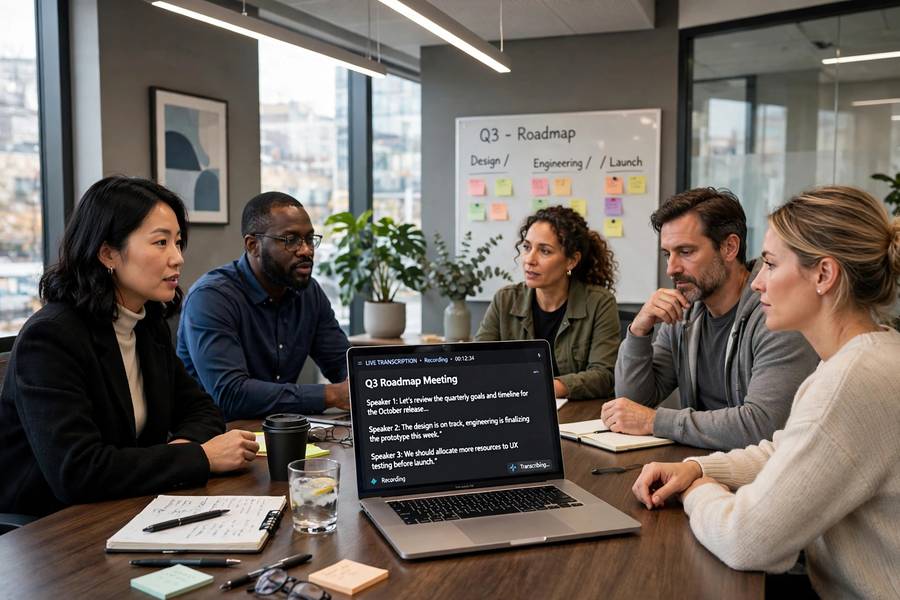
After the Meeting: The Workflow That Matters
The transcript arrives. Now what? The workflow that turns raw capture into useful notes:
1. Read the AI summary first (3 minutes). Get the machine’s take: key points, decisions, action items. This orients you before you dive in.
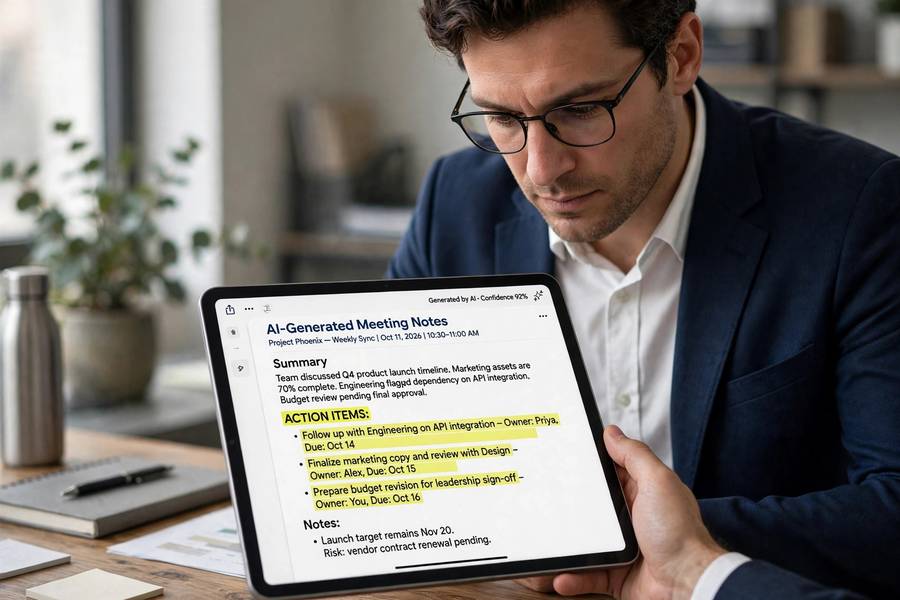
2. Correct and annotate (5 minutes). Fix misattributed speakers, correct misheard terms (it will mangle jargon and names — always), add your private annotations about dynamics and context. This is the highest-value five minutes in the workflow.
3. Extract action items with owners and dates (2 minutes). The AI usually drafts these; you verify and sharpen. Every action item needs three things: what, who, by when. Anything missing one is a wish, not a task.
4. Distribute selectively. Send the cleaned summary to attendees; send action items to owners individually (people act on direct asks, not on cc’d lists); file the full notes where your team keeps them. Different audiences, different cuts — the AI can generate each version from the same source.
5. File for searchability. Tag with project, date, and key topics. Future you will thank present you when searching “what did we decide about the API rate limits” six months from now.
Total: ten minutes per meeting. Compare with the old world: frantic typing during, then 20 minutes reconstructing after from cryptic half-sentences. The AI workflow is faster and produces better notes — if you do the review. It’s one of the highest-leverage pieces of how to be more productive with AI overall.
The Prompts That Produce Useful Notes
If your tool accepts custom prompts or you’re processing transcripts manually, these patterns work:
The executive summary: “Summarize this meeting transcript for [audience]. Include: decisions made, action items with owners, open questions, and key discussion points. Keep it under 300 words: [transcript].”
The action extractor: “Extract all action items from this transcript. For each: the task, the owner (infer from context if not explicit), and any mentioned deadline. Flag items where the owner is unclear: [transcript].”
The decision log: “List every decision made in this meeting, with the reasoning discussed and any dissent noted: [transcript].”
The follow-up drafter: “Draft a follow-up email to attendees covering: thanks, key decisions, action items per person, next meeting date. Tone: professional and warm: [summary].”
The pattern across all of them: specify the audience, the format, and what to include. “Summarize this” gives you mush; “summarize for the exec team, decisions and blockers only, 200 words” gives you something usable.
Privacy, Consent, and the Recording Question
The serious section — get this wrong and the productivity gains won’t matter:
Consent. Announce recording at the start, every time: “I’m running our AI notetaker today — everyone okay with that?” Most jurisdictions require one-party or all-party consent; all-party is the safe standard regardless of law. If someone objects, respect it — turn it off, take manual notes.
Company policy. Many companies now have specific AI-notetaker policies: approved tools, data retention rules, restrictions on external participants. Check before your first use, not after your fiftieth.
Data storage. Know where transcripts live, who can access them, and how long they’re kept. A transcript is a permanent, searchable, quotable record — more dangerous than anyone’s handwritten notes ever were. Treat it accordingly.
The chilling effect. People speak less freely when recorded — fewer half-formed ideas, less honest disagreement, more performance. This is a real cost. For sensitive discussions (personnel, strategy debates, brainstorming), consider going notetaker-free deliberately. The best ideas often need unrecorded air.
External meetings. Extra caution with clients, partners, candidates: their consent matters more, their data policies may differ, and the power dynamics are trickier. When in doubt, ask explicitly and offer to share the notes.
The Review Step (Don’t Skip This)
I’ll say it once more, plainly: unreviewed AI notes are a liability.
The AI will misattribute quotes (“Sarah said the timeline is impossible” — actually it was James, quoting Sarah’s email). It will mangle names and terms. It will miss sarcasm, flatten disagreement into consensus, and occasionally invent an action item nobody agreed to. These aren’t rare edge cases — they’re routine.
The review is also where the notes become yours. The AI gives you capture; the review gives you understanding. Reading the summary critically — “is this actually what happened? what’s missing? what did it get wrong?” — is how you stay intellectually engaged with your own meetings rather than outsourcing comprehension to software.
Ten minutes. Every meeting. Non-negotiable. The people who skip it end up with a searchable archive of plausible-sounding fiction — worse than no notes at all, because it looks authoritative.
Common Mistakes
Sending raw AI output. The unreviewed summary, forwarded to the team. Contains errors, misses nuance, occasionally embarrasses. Always review.
Recording without consent. Legal risk, trust risk, career risk. Announce every time.
Never searching the archive. The compound value of AI notes is the searchable history — “what did we decide about X?” answered in seconds. If you’re not searching it, you’re leaving half the value on the table. Build the habit.
Frequently Asked Questions
Use an AI notetaker (Otter, Fireflies, Fathom, or built-in Teams/Zoom/Meet features) to transcribe and summarize. Set agenda context before, stay present during (mark key moments), then spend 10 minutes after reviewing: correct errors, add human context, extract action items with owners and dates, and distribute selectively.
Yes — announce it at the start of every meeting and get agreement. Many jurisdictions legally require consent, and workplace trust requires it regardless. Check your company’s AI policy for approved tools and data rules, and be extra careful with external participants like clients or candidates.
Good for standard meetings, shaky for messy ones. AI routinely misattributes speakers, mangles jargon and names, misses sarcasm and disagreement, and occasionally invents action items. Always review before sharing — unreviewed AI notes are a searchable archive of plausible fiction.
For most users, start with what’s built into your company’s platform (Teams, Zoom, or Meet) — lowest friction and best data handling. Dedicated tools like Fathom, Otter, and Fireflies offer better summaries and search. The workflow (review, annotate, extract actions) matters more than the tool choice.