My first pair of wireless earbuds died on me mid-run — right bud first, then the left, then silence, three miles from home. I stood there on the trail feeling personally betrayed by two thimbles of plastic. But it got me curious: what is actually inside these things? How do two separate buds, with no wire between them, play the same song at the same time? And what does that little case actually do besides get lost in my bag?
I’ve since tested more earbuds than I can count — cheap, flagship, and sport ones that survived my sweatiest workouts. Here’s everything I learned, in normal-human language: how the tech works, and whether the expensive pairs are worth it.

Bluetooth Is the Whole Trick
Strip away the marketing and wireless earbuds are, at heart, tiny Bluetooth speakers that live in your ears. Bluetooth is just radio — short-range radio waves carrying digital audio from your phone to the buds. Same family of invisible waves as WiFi, different neighborhood. (I wrote a whole demystification of how WiFi works if invisible waves are your thing now.)
Pairing — that first-time connection dance — is really just a secret handshake. When you open the case or hold the button, the earbuds start shouting “I’m here! I’m available!” on Bluetooth frequencies. Your phone hears the shout, you tap the name, and the two devices swap cryptographic keys — a secret code they’ll use to recognize each other forever. That’s why reconnecting later is instant: they already know the handshake.
The “Bluetooth 5.3” or “5.4” on spec sheets? Just versions of the rulebook, like cookbook editions — newer mostly means better range, stability, and battery efficiency. A 5.3 bud talking to a 5.0 phone uses the 5.0 rules; they always agree on the oldest version both understand. Don’t overthink it; anything recent is fine.
How Two Earbuds Stay in Sync
This is the cleverest part, and the question I get most: there’s no wire between the buds, so how do they stay perfectly in time?
Early true-wireless buds used a relay system: your phone sent the full stereo signal to one “primary” bud (usually the right), which forwarded the left channel to the other. It worked, but the middleman bud did double duty — receiving, then re-transmitting — draining its battery faster and occasionally causing that infuriating one-bud dropout.
Modern buds mostly use independent connections: your phone talks to each bud directly — like a teacher addressing two students by name instead of whispering through one of them. More efficient, more stable, and the reason dropouts are rarer than they used to be. When one bud does cut out now, it’s usually a low battery or interference — a crowded gym full of Bluetooth devices is basically a shouting match on the same radio frequencies.
Tiny timing chips keep both buds locked to the same clock, accurate to microseconds — your brain would hear even a few milliseconds of mismatch as an echo. Genuinely impressive engineering: two independent computers, no wire, in perfect unison.
The Magic Box: What the Charging Case Actually Does
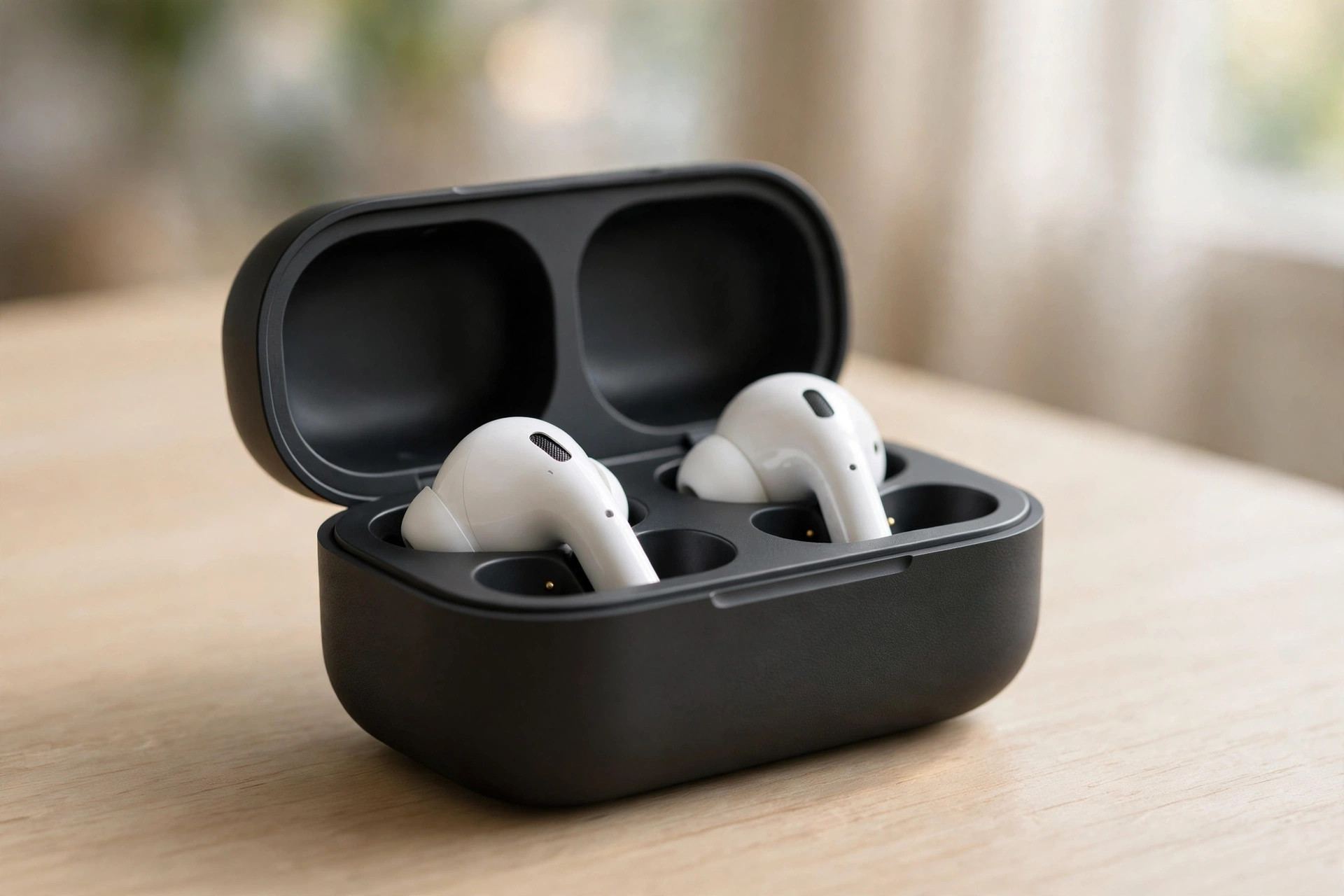
The case looks like a fancy carrying box. It’s secretly the most important part of the system. It does three jobs:
1. It’s a battery pack. Each earbud holds a tiny battery — roughly 4–8 hours depending on the model and whether noise cancelling is on. The case holds a much bigger battery that refills the buds every time you dock them, usually 3–4 full charges. That “30 hours total battery life” on the box? Buds + case combined: the buds alone give you a workday; the case stretches it to a work week.
2. It’s the pairing remote. Opening the lid wakes the buds and reconnects them to your phone. The case button (if it has one) forces pairing mode for new devices. Closing the lid disconnects them — which is why your music sometimes keeps playing from your pocket when the case sits open in your bag. The buds think they’re still in your ears.
3. It’s protection. Underrated: earbuds are small, losable, and full of delicate microphones. The case keeps them together, keeps pocket lint out of the charging contacts, and keeps the buds from rattling around and dying of a thousand tiny impacts.
Charging works through little metal contact pins: drop the bud in, magnets snap it into place, pins touch pads, power flows. No plug, no fuss. The case itself charges over USB-C, or a wireless pad on fancier models.
Why Sound Quality Varies So Much
Why does a $30 pair sound like a phone call from 2007 while a $250 pair sounds like a concert? Three things: the driver, the codec, and the tuning.
The driver is the actual tiny speaker inside each bud — a miniature diaphragm that vibrates to make sound waves. Bigger, better-engineered drivers move air more precisely. Cheap buds use basic drivers; premium ones use balanced armatures or dual drivers (one for bass, one for treble — a tiny two-speaker system in each ear). You can’t see the difference, but your ears absolutely can.
The codec is the compression language your phone and buds agree on. Bluetooth can’t carry raw studio audio — not enough bandwidth — so audio gets compressed, sent, and decompressed. Basic codecs (SBC) compress aggressively and sound just okay; better ones (AAC, aptX, LDAC) preserve more detail. Here’s the catch: both your phone and your buds must support the fancy codec, or they fall back to the basic one. iPhones top out at AAC — so a bud’s LDAC support does nothing for an iPhone user. Match your codec to your phone or you’re paying for a feature you can’t use.
Tuning is the invisible art — how the manufacturer balances bass, mids, and treble. Two buds with identical hardware can sound wildly different because of tuning choices. This is why reviews matter more than spec sheets: tuning is taste, and taste doesn’t fit in a table.
Battery Life: Why the Numbers Are Messy
Battery specs on earbud boxes are the most creatively interpreted numbers in tech. Here’s how to read them honestly.
The headline number (“36 hours!”) is always buds + case combined — typically 6–9 hours per bud charge, times 3–4 case refills, measured at 50% volume with noise cancelling off. Crank the volume, enable ANC, take calls (the mics are power-hungry), and you’ll get noticeably less. My rule of thumb: subtract 20–30% from the box claim for heavy use.
Two things drain buds fastest: active noise cancelling (constant computation — tiny microphones listening to the world and generating anti-noise in real time) and calls (two-way radio plus mic processing). Music at moderate volume with ANC off is the efficiency sweet spot.
The case’s own battery slowly self-discharges even sitting in a drawer — a few percent a week. If your “fully charged” case is dead after a month untouched, that’s normal, not broken.

Why Calls Sound Worse Than Music
Everyone notices this: music sounds rich, but your voice on calls sounds thin and distant. It’s not your imagination — calls are genuinely harder for earbuds.
Music is one-way: phone sends audio, buds play it. Calls are two-way, and the microphone is the weak link. The mics sit in the bud at your ear — inches from your mouth, but pointed the wrong way, buffeted by wind, competing with every background noise. Your phone, held to your face, has a huge acoustic advantage: proximity.
Buds fight back with beamforming: multiple mics per bud compare what they hear, and software keeps the signal that’s consistent (your voice, roughly below the bud) while suppressing the rest (wind, traffic). It’s clever and it mostly works indoors. Outdoors in wind, physics wins — a mic the size of a pinhead can’t beat a gust. That’s why everyone sounds like they’re in a storm when they call you from a windy street.
There’s also a bandwidth wrinkle: when the mic activates, many buds drop to lower-quality audio to make room for two-way traffic. Your music literally gets worse during calls on some models — a protocol limitation, not a defect.
Annoyances, Explained
One bud keeps disconnecting. Nine times out of ten, it’s battery — the relay-era buds drained unevenly, and even modern ones can drift apart in charge level. Clean the charging contacts (pocket lint is the usual culprit), make sure both buds snap in with the magnetic click, and check for firmware updates. If it’s always the same bud, that battery may be aging — small batteries degrade, and there’s no replacing them.
Audio lags behind video. Bluetooth audio takes 100–300 milliseconds to encode, transmit, and decode, and your video app doesn’t know about the delay — lips move before words arrive. Most phones and apps compensate automatically now (they delay the video to match), and low-latency codecs help, but live video can still feel slightly off. Physics plus processing, not a broken product.
“Bluetooth 5.4” — should I care? Only at the margins. Newer versions improve range and efficiency, but the jump from 5.0 to 5.4 is evolutionary, not revolutionary. A well-made 5.2 bud beats a sloppy 5.4 every time — buy the product, not the version number.
They fall out. That’s fit, not tech — but a loose seal kills bass and ruins noise cancelling. Try all the tip sizes in the box; most people default to the pre-installed mediums and never try the larges. The larges changed my life. (Slight exaggeration. Slight.)
My Honest Take: Are Pricier Pairs Worth It?
My signature question, and here’s my honest answer: it depends on what you’re paying for.
Under $50, you’re buying disposable tech — fine for gym podcasts, no judgment. Sound is thin, mics are rough, lifespan a year or two. Totally valid if that’s the budget.
The $100–$180 range is the sweet spot, in my experience. That’s where you get genuinely good drivers, decent noise cancelling, reliable connections, and cases that survive being sat on. The jump from $40 to $150 is enormous — the single biggest value leap in all of audio.
Above $200, you’re paying for refinements: slightly better ANC, premium materials, brand-specific features (like seamless switching between that brand’s devices). The jump from $150 to $250 is real but small — maybe 10–15% better in ways you’ll notice on a plane but not on a walk. Worth it for frequent flyers and audio nerds; overkill for podcast commutes.
One more thing: fit beats price. A $120 pair that seals perfectly in your ears beats a $280 pair that doesn’t. Try before you buy, or buy somewhere with a good return policy — your ear canals are unique; reviews can’t know them.
For movie nights, good earbuds are half the experience — I learned a lot about what makes films look and sound great researching how movies are actually made. And if this invisible-wireless stuff fascinates you, my technology section has more explainers in the same plain-English style.

Frequently Asked Questions
Via Bluetooth radio. During pairing, the earbuds broadcast their availability, your phone finds them, and the two swap security keys. After that first handshake, they reconnect automatically whenever the case opens near your phone.
Usually it’s battery — one bud drains faster than the other, especially on older relay-style models. Dirty charging contacts (pocket lint) preventing a full charge is the other common cause. Clean the contacts, confirm the magnetic snap when docking, and update the firmware.
The case contains a larger battery. When you dock the buds, magnets align them and small metal pins touch charging pads, transferring power with no plug needed. A full case typically refills the buds three to four times before the case itself needs charging.
Yes, for listening — the case isn’t needed during playback. But without it you can’t recharge the buds, can’t easily re-pair them to new devices, and they’re unprotected. The buds work fine; they just slowly run down.
Bluetooth audio takes 100–300 milliseconds to encode, transmit, and decode, so sound arrives slightly after the picture. Most phones and video apps compensate by delaying the video to match. Low-latency codecs reduce it further, but a tiny lag can remain on live content.
Many modern pairs support multipoint connection — staying paired to your phone and laptop simultaneously and switching automatically when a call comes in. Check the specs: it’s a feature, not a given, and older or budget models usually lack it.
The Bottom Line
Wireless earbuds are a small miracle of coordination: Bluetooth radio carrying compressed audio, two independent computers in microsecond sync with no wire between them, and a case that’s secretly a battery pack, pairing remote, and suit of armor in one. Sound differences come down to tiny speakers, compression languages, and tuning — and price differences to how much of each you’re getting.
My first pair betrayed me on that trail. My current pair? They’ve survived two years of runs, flights, and one unfortunate trip through the washing machine (the case saved them). Understand the tech, buy for your actual use, try the large tips — and you’ll never stand on a trail in silence again.