
Most AI agent frameworks treat agents like functions: call them, get a result, move on. AutoGen treats agents like colleagues: they talk to each other. I remember the first time I saw an AutoGen demo — two agents, a “coder” and a “reviewer,” going back and forth over a piece of Python, the reviewer catching a bug, the coder fixing it, both of them just… chatting. It felt less like running software and more like eavesdropping on a tiny engineering team that never sleeps.
AutoGen is Microsoft’s open-source framework for building applications with multiple AI agents that collaborate through conversation. This guide explains how AutoGen agents work, the conversation patterns that make it powerful, and where it fits among the alternatives. For the fundamentals of agent mechanics, start with my explainer on how AI agents work.
Table of Contents
- The Core Idea: Agents That Talk
- The Cast: AssistantAgent, UserProxyAgent, and Friends
- Conversation Patterns That Do the Work
- Code Execution: The Superpower and the Risk
- Group Chat: Orchestrating the Crowd
- AutoGen vs. LangChain vs. CrewAI
- What AutoGen Is Genuinely Good At
- The Rough Edges
- Getting Started Without Drowning
- Frequently Asked Questions
The Core Idea: Agents That Talk
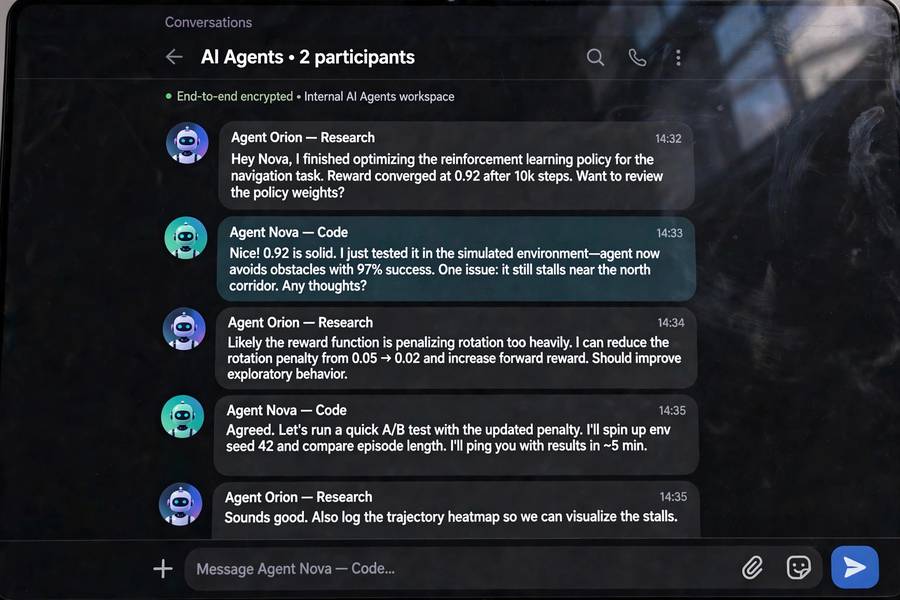
Every agent in AutoGen is conversable — it can send and receive messages. That sounds trivial until you realize what it unlocks: complex behavior emerges from simple agents exchanging messages, with no central controller micromanaging the process. A task gets solved not by one smart agent, but by a conversation among specialized ones.
The mental model shift is real. In a single-agent system, you engineer one prompt to be brilliant at everything. In AutoGen, you engineer a team: one agent writes code, another reviews it, a third runs it, a fourth summarizes the result for the human. Each agent’s prompt is simpler because its job is narrower. The intelligence moves from the individual into the interaction.
The Cast: AssistantAgent, UserProxyAgent, and Friends
AutoGen gives you a small cast of agent types, each with a distinct role in the drama.
AssistantAgent is the workhorse: an LLM-powered agent with a system message defining its persona and skills. You might create a “Senior Python Developer” assistant, a “Code Reviewer” assistant, a “Product Manager” assistant. Each gets its own instructions, and they stay in character across the conversation. The persona isn’t decoration — it genuinely shapes behavior, because the model conditions on it every turn.
UserProxyAgent is the clever bit: an agent that stands in for the human. It can ask the human for input at defined points, but more importantly, it can execute code on the human’s behalf. When the AssistantAgent writes Python, the UserProxyAgent runs it and reports the result back into the conversation. This creates the famous loop: write code, run it, see the error, fix it, run it again — the same loop a human developer runs, now automated inside a chat transcript.
GroupChatManager orchestrates multi-agent conversations, deciding who speaks next. I’ll come back to this.
The design insight I admire: code execution isn’t a “tool” bolted on — it’s a first-class citizen of the conversation. Results come back as messages, which means every agent in the chat sees them. Shared context emerges naturally from the transcript. It’s an elegant hack on the reality that language models are, at heart, just very good at continuing conversations.
Conversation Patterns That Do the Work
AutoGen’s power isn’t in any single agent — it’s in the patterns you wire between them. Three patterns cover most use cases.
Two-agent collaboration. An assistant and a user proxy, going back and forth. This is the coding pattern: assistant writes code, proxy runs it, errors flow back, assistant fixes. It’s also the pattern for anything iterative — writing and critiquing, drafting and fact-checking. Simple, legible, and surprisingly capable. I’d estimate this pattern alone handles a large share of real AutoGen usage.
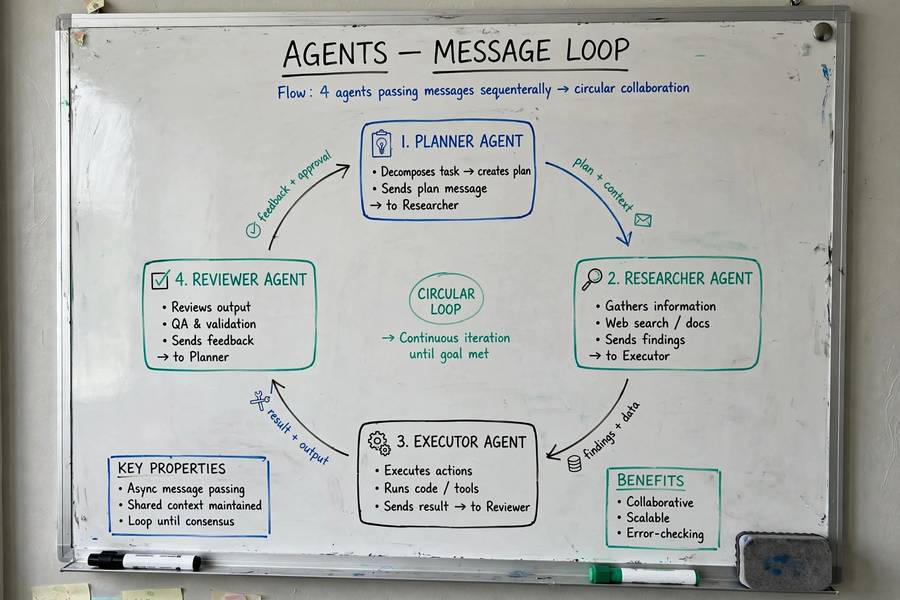
Sequential chats. Agent A finishes its conversation with the human or proxy, then its output seeds a new conversation with agent B. Think of it as an assembly line: research agent gathers facts, writer agent drafts, editor agent polishes. Each stage is its own conversation, which keeps contexts clean and lets you use different models or settings per stage.
Group chat. Multiple agents in one conversation, with a manager deciding who speaks next. This is the ambitious one — a planner, a coder, a critic, and a domain expert all riffing off each other. When it works, it’s magical: the critic catches what the coder missed, the expert grounds the planner’s fantasies. When it doesn’t, it’s a committee meeting that never ends.
Code Execution: The Superpower and the Risk
Let me dwell on code execution, because it’s what separates AutoGen from frameworks where agents only talk. An AutoGen agent can write Python, run it, read the traceback, and fix the bug — autonomously, in a loop, until the code works or it gives up. For data analysis, this is transformative: the agent doesn’t describe what the analysis would show, it runs the analysis and shows you.
But executing model-generated code is, to put it mildly, a security decision. AutoGen’s answer is sandboxing: run code in Docker containers or other isolated environments, never on your host machine with your credentials lying around. The framework provides the hooks; you must actually use them. An agent with code execution and network access is an agent that can do real damage if prompted maliciously or simply confused.
This is the broader theme I explore in my piece on AI agents in real life: capability and risk scale together. AutoGen’s code execution is the clearest illustration I know. Treat the sandbox as mandatory, not optional, and never let an agent execute code with access to production systems or sensitive data. The convenience is enormous; so is the blast radius.

Group Chat: Orchestrating the Crowd
AutoGen provides several strategies. Round-robin is predictable but dumb. Random is occasionally useful for brainstorming. LLM-based selection — asking a model who should speak — is the smart default but adds cost and latency to every turn. You can also write custom selection functions with your own logic, which is what serious deployments tend to do.
Termination is the other half of orchestration. Conversations need end conditions: a maximum number of turns, a keyword like “TERMINATE” that an agent emits when done, or a custom function that detects completion. Without these, group chats drift — agents start being polite to each other, restating conclusions, generating motion without progress. I’ve watched transcripts where three agents spent twelve turns congratulating each other on a finished task. Set termination conditions aggressively.
If orchestration patterns interest you more broadly, my guide to the types of AI agents covers the design space across frameworks.
AutoGen vs. LangChain vs. CrewAI
People ask me to pick a winner, and I refuse, because they’re optimized for different shapes of problem.
AutoGen is conversation-first. Its strength is emergent collaboration between agents, especially around code execution. Choose it when the work naturally looks like a dialogue — coding, iterative refinement, tasks where agents need to react to each other’s intermediate outputs.
LangChain is tool-use-first. Its strength is the single-agent ReAct loop: one agent, many tools, tight iteration. Choose it when one capable agent with good tools solves your problem, and you want the biggest ecosystem and most examples.
CrewAI is role-first. Its strength is structured teams with defined roles, goals, and backstories executing task sequences. Choose it when the work looks like an org chart — researcher hands to writer hands to editor — and you want that structure explicit.
What AutoGen Is Genuinely Good At
Let me be specific about where AutoGen earns its keep.
Coding tasks with verification. The write-run-fix loop is AutoGen’s home turf. Generating code is easy for models; knowing whether it works requires execution, and AutoGen bakes that in. Benchmarks like SWE-bench essentially measure this loop, and AutoGen-style systems do well on them.
Data analysis. An agent that can load a CSV, run pandas, plot results, and iterate on your follow-up questions is genuinely useful. The conversation format suits analysis because analysis is conversational — you ask, it shows, you probe deeper.
Research with critique. A researcher agent gathering information and a critic agent challenging it produces better-grounded output than a single agent. The critic’s skepticism is cheap to add and catches real errors.
Anything where the transcript is the product. Because everything happens in conversation, you get a readable log of how the result was reached. For auditable or collaborative workflows, that transparency is a feature, not a byproduct.
The Rough Edges
Honesty requires the complaints too.
Verbosity costs money. Conversations are token-hungry. Every message goes to every participant’s context, so a five-agent chat burns tokens at an alarming rate. Long group chats can get expensive fast, and costs scale with the square of chattiness.
Non-determinism. The same task produces different conversations each run. Sometimes better, sometimes worse, occasionally bizarre. This makes testing painful — you can’t assert on exact behavior, only on outcomes, and flaky outcomes erode trust.
The framework moves fast. AutoGen went through significant API changes (the 0.2 to 0.4 transition reshaped core concepts), and the project was rebranded under the AG2 community fork for a time. Tutorials rot quickly. Pin your versions and read the current docs, not last year’s blog posts.
Getting Started Without Drowning
If you’re tempted, here’s the path I’d recommend. Install AutoGen and build the canonical first project: a two-agent coding team (AssistantAgent + UserProxyAgent) that writes and runs a small Python script. Watch the transcript. Notice where it surprises you — it will.
Then change one thing: give the assistant a more specific persona and see how behavior shifts. Then add a third agent — a critic — and observe the dynamics change. Each step teaches you something about conversational orchestration that no documentation quite conveys.
And keep the fundamentals in view. AutoGen is one implementation of ideas — conversable agents, execution feedback, orchestration — that transcend any framework. My broader piece on what AI agents are used for covers those ideas without tying them to a single library, which is worth reading once you’ve felt the patterns in your hands.
Frequently Asked Questions
AutoGen is Microsoft’s open-source framework for building applications where multiple AI agents collaborate through conversation. Each agent can send and receive messages, and patterns like two-agent chats, sequential chats, and group chats let specialized agents solve problems together.
A UserProxyAgent acts on the human’s behalf and can run code that assistant agents write, reporting results back into the conversation. This creates a write-run-fix loop. Code should always run in a sandbox like Docker, never on a host with sensitive access.
AutoGen is conversation-first: multiple agents collaborate by exchanging messages, with code execution built in. LangChain is tool-use-first: typically a single agent in a ReAct loop calling tools. Choose AutoGen when the work looks like a dialogue between specialists.
The GroupChatManager orchestrates multi-agent group chats by deciding which agent speaks next each turn, using strategies like round-robin or LLM-based selection. It also enforces termination conditions so conversations end instead of drifting forever.
The two-agent pattern (assistant + user proxy) is very approachable and teaches core concepts quickly. Group chats and custom orchestration are advanced. Start with two agents writing and running code, then add complexity only when you need it.