
When you watch an AI agent work — searching, reading, trying something, correcting itself — it can feel like watching something think. But what’s actually happening under the hood? Having tested these systems extensively, I can tell you the reality is both less mysterious and more interesting than it looks.
If you’re new to the concept, start with what an AI agent actually is. This article goes one level deeper: the actual mechanics of how agents turn a goal into a sequence of decisions.
Table of Contents
- The Core Loop: Perceive, Reason, Act
- Step 1: Breaking the Goal Into a Plan
- Step 2: Choosing the Next Action
- Step 3: Using Tools to Act
- Step 4: Observing Results and Self-Correcting
- How Language Models Do the “Reasoning” Part
- Where Agent Decision-Making Breaks Down
- Frequently Asked Questions
The Core Loop: Perceive, Reason, Act
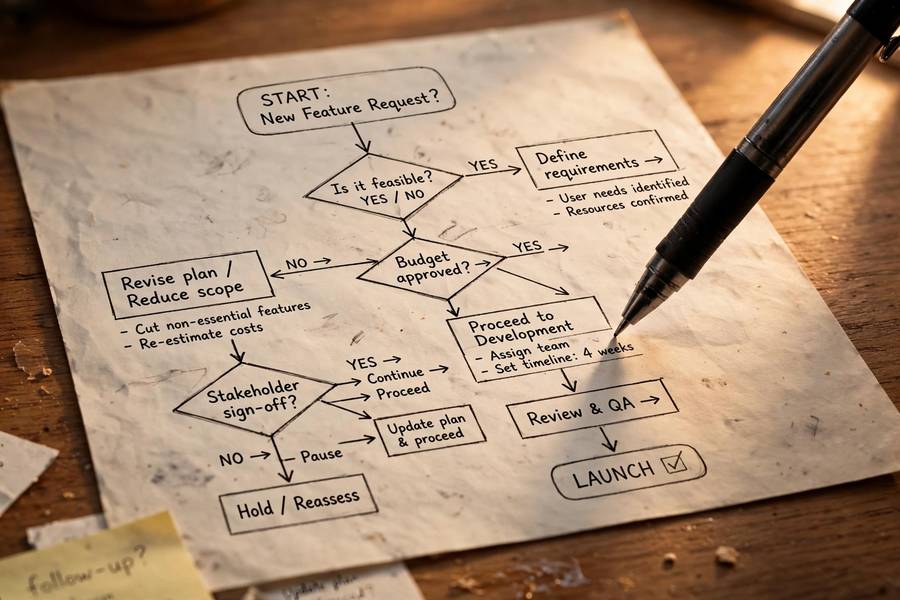
Every AI agent, from a thermostat to the most advanced research system, runs the same fundamental loop:
- Perceive — gather information about the current state of the world
- Reason — decide what to do next based on that information and the goal
- Act — take the action
- Repeat — observe what changed, and go again
Your thermostat does this with temperature readings and a threshold comparison. A modern AI agent does it with web pages, tool outputs, and language-model reasoning. The loop is identical; only the sophistication of each step differs.
What makes this loop powerful is iteration. No single decision has to be perfect, because the agent gets to observe the result and adjust. It’s the same reason humans learn by doing rather than by planning perfectly upfront. The loop turns a hard problem (get everything right first try) into a manageable one (keep improving until it’s good enough).
The loop also explains why agents can handle tasks that static software can’t. A traditional program follows a fixed script; when something unexpected happens, it crashes or gives up. An agent observes the unexpected thing and reasons about what to do instead. That adaptability — limited as it still is — is the whole point.
Step 1: Breaking the Goal Into a Plan
When you give an agent a goal like “research the best noise-cancelling headphones under $200,” it doesn’t start acting randomly. The first reasoning step is decomposition: breaking the big goal into smaller sub-tasks.
A typical plan might look like: search for current models in the price range → identify the top contenders from reviews → compare their specs and ratings → check for known issues → write up the comparison. Each sub-task is concrete enough to act on.
How does the agent generate this plan? For language-model-based agents, planning is itself a language task: the model is prompted to think through the steps before acting, often producing an explicit plan you can read. I’ve watched agents write surprisingly sensible plans — and occasionally bizarre ones, like planning to “call the manufacturer” for information it could just search for.
Planning quality varies enormously with how well the goal is specified. Vague goals produce vague plans. “Research headphones” gets you a meandering plan; “compare the top 5 noise-cancelling headphones under $200 by battery life, comfort, and sound quality” gets you a focused one. This is why briefing an agent well matters so much — you’re really programming its plan.
Step 2: Choosing the Next Action
With a plan in hand, the agent faces a decision at every step: what do I do right now? This is the moment-to-moment decision-making that makes agents feel intelligent.
The agent considers its available actions — search the web, read a page, run code, check a calendar, ask the user a question — and picks the one most likely to advance the current sub-task. For language-model agents, this choice is made by generating text: the model essentially “thinks out loud” about which action makes sense, then executes it.
What fascinates me is how human-like the failure modes are at this step. Agents pick the obvious action when a subtle one was needed. They repeat actions that already failed, hoping for different results. They sometimes choose impressive-sounding actions over effective ones — like running a complex analysis when a simple search would do.
Good agent design adds structure here: constraints on which actions are available, guidance about preferred strategies, and sometimes explicit rules (“always verify prices on the retailer’s own site, not just review aggregators”). The less you leave to the model’s raw judgment, the more reliable the decisions.

Step 3: Using Tools to Act
Tools are what separate agents from chatbots. A chatbot can only produce text; an agent can search, click, calculate, read files, send messages, and interact with software the way you would. If you’re new to the distinction, start with AI tools — agents are what you get when those tools are wired into an autonomous loop.
Each tool use is itself a small decision problem. The agent must: choose the right tool, format its inputs correctly, and interpret the output. A web search needs the right query; a code execution needs valid code; a calendar check needs the right date range. Get any of these wrong and the action fails — which is fine, because the loop continues, but each failure costs time and compute.
The most impressive tool use I’ve seen is compositional: the agent uses one tool’s output as another tool’s input, chaining them toward the goal. Search finds a product page; reading the page finds a spec sheet; the spec sheet’s numbers go into a calculation; the calculation informs the recommendation. Watching this chain execute correctly feels like watching competence.
The background on how the underlying models learned these capabilities is in how AI models are trained — tool use emerges from training on examples of humans using tools, which is both why it works and why it’s imperfect.
Step 4: Observing Results and Self-Correcting
This is the step that makes the loop work: after acting, the agent observes what happened and decides whether to continue, adjust, or try something different.
Self-correction takes several forms. The simplest is retry logic: a search returned nothing useful, so try different keywords. More sophisticated is plan revision: the initial plan assumed information that turned out not to exist, so replan around what’s actually available. The most advanced is error recognition: the agent notices its own earlier step was wrong and backtracks.
I’ll be honest: this is also where agents are weakest. They often fail to notice their own errors, especially subtle ones. An agent that misread a price in step 3 will happily build the rest of its analysis on the wrong number. They also struggle with knowing when to stop — I’ve watched agents keep “refining” a search long past the point of diminishing returns, burning compute on the tenth query when the third was fine.
The practical implication: for important tasks, you are the outer correction loop. The agent corrects itself as well as it can; you correct what it missed. That division of labor — agent does the volume, human does the verification — is the productive way to work with these systems today.
How Language Models Do the “Reasoning” Part
A word on what’s actually happening when a language-model agent “reasons.” The model predicts text — including text that looks like reasoning. When it “thinks through” a plan, it’s generating the most likely continuation of a reasoning-style prompt, based on patterns in its training data.
This works better than it has any right to, because human reasoning patterns are all over the training data. The model has seen millions of examples of people breaking down problems, weighing options, and correcting mistakes — so it can reproduce the shape of reasoning convincingly.
But it’s pattern-matching, not understanding. The model doesn’t have a mental model of your goal the way you do; it has statistical associations between goal-descriptions and plan-descriptions. Usually that’s enough. Sometimes — especially with novel situations or tricky edge cases — it produces reasoning that looks right but is subtly wrong. The confident mistake is the signature failure of this entire paradigm.
This is why I keep coming back to verification. The reasoning usually works. “Usually” is doing a lot of heavy lifting in that sentence.
Where Agent Decision-Making Breaks Down
Let me catalogue the failure modes I’ve actually observed, because knowing them is more useful than any amount of theory:
Compounding errors. A small mistake in step 2 becomes a big mistake by step 8, because every subsequent decision builds on the wrong foundation. Long task chains are fragile.
Goal misinterpretation. The agent optimizes for what it thinks you meant, not what you meant. “Cheapest flight” gets you a 14-hour layover. The more autonomy you grant, the more this matters.
Tool myopia. The agent uses the tools it has even when the situation calls for asking you. It will search the web five times rather than ask one clarifying question — because asking wasn’t in its action set, or because it overestimates its own ability.
No real stakes-awareness. The agent doesn’t feel the difference between drafting an email and sending it, between researching a purchase and making one. Every action feels the same to it. The boundary between reversible and irreversible exists only if you enforce it.
Prompt injection. Malicious instructions hidden in web pages, emails, or documents can hijack the agent’s decision-making. This is an unsolved problem and the reason I treat every external content source as potentially hostile.
None of these are reasons to avoid agents. They’re reasons to supervise them — with the level of supervision matched to the stakes. Drafting a summary? Light touch. Anything involving money, messages to other people, or deleted data? Eyes on, always.
Frequently Asked Questions
AI agents run a perceive-reason-act loop: they gather information about the current state, decide on the next action (breaking goals into plans, choosing tools, executing), observe the result, and self-correct. Language-model agents do the “reasoning” by generating text that follows human reasoning patterns from their training data.
Not in the human sense. Language-model agents predict text that looks like reasoning, based on patterns in their training data. This works remarkably well for familiar situations but can produce subtly wrong reasoning in novel ones. It’s sophisticated pattern-matching, not understanding — which is why verification matters.
At each step, the agent considers its available actions (search, read, calculate, message, etc.) and picks the one most likely to advance its current sub-task. For language-model agents, this choice is made by generating reasoning text about which action makes sense. Good agent design constrains the options and adds guidance about preferred strategies.
Partially. They can retry failed actions, replan when assumptions prove wrong, and sometimes backtrack on errors. But they often miss their own subtle mistakes — a misread number in step 3 propagates through the whole analysis. For important tasks, the human is the outer correction loop.
Agents struggle with knowing when to stop. They’ll keep refining searches or re-checking work long past diminishing returns because they lack a good sense of “good enough.” Setting explicit stopping criteria in your instructions (“stop after 5 sources” or “give me your best answer after 10 minutes”) helps a lot.
Prompt injection is when malicious instructions hidden in web pages, emails, or documents hijack an agent’s decision-making — for example, a webpage telling the agent to send data to an attacker. It’s an unsolved problem and the reason every external content source should be treated as potentially hostile, especially for agents with access to sensitive tools.