
LangChain agents are AI systems built with the LangChain framework that don’t just generate text — they reason through problems step by step, pick tools, take actions, and observe results. This guide explains what LangChain agents actually are, how the famous ReAct loop powers them, and how to build one yourself. If you’re new to the underlying mechanics, my explainer on how AI agents work covers the general picture.
Table of Contents
- What a LangChain Agent Actually Is
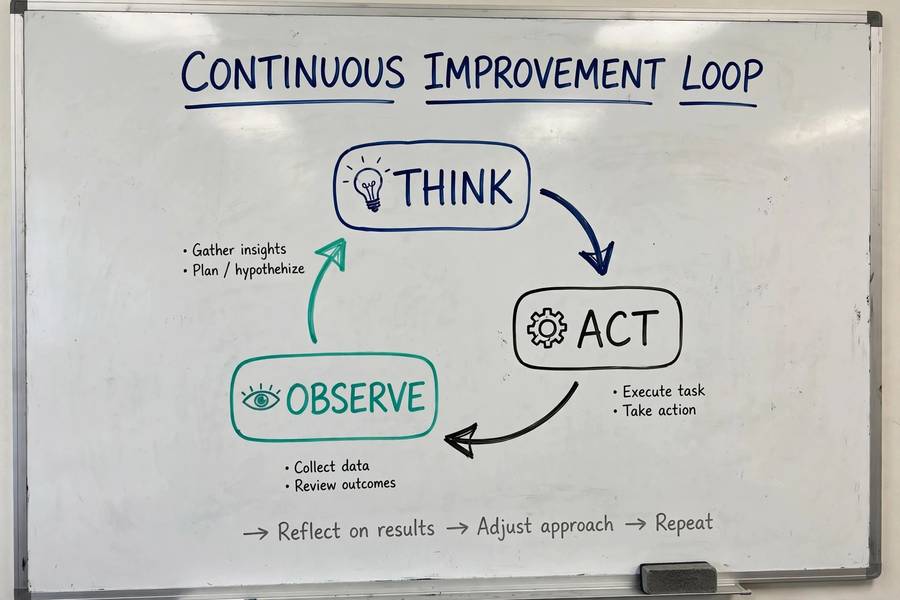
- The ReAct Loop: Thought, Action, Observation
- The Three Ingredients: Model, Tools, Prompt
- A Minimal Agent, Conceptually
- OpenAI Functions Agents vs. ReAct Agents
- What Agents Are Good At (and Terrible At)
- The Ecosystem: LCEL, LangGraph, LangSmith
- Common Failure Modes and How to Fix Them
- Should You Use LangChain?
- Frequently Asked Questions
What a LangChain Agent Actually Is
Let me strip away the marketing language. A LangChain agent is a loop. A language model sits in the middle of that loop, and on every iteration it looks at three things: your original request, everything that has happened so far, and a list of tools it is allowed to use. Then it decides: do I answer now, or do I call a tool first?
The ReAct Loop: Thought, Action, Observation
The core pattern behind classic LangChain agents is called ReAct — reasoning plus acting. It comes from a 2022 research paper, and the idea is disarmingly simple: interleave verbal reasoning traces with actions.
Here’s the rhythm:
- Thought. The model writes out what it’s thinking: “The user wants the population of X. I don’t know this reliably. I should search for it.”
- Action. It calls a tool:
search("population of X 2025"). - Observation. The tool returns a result, which gets appended to the transcript.
- Repeat. The model thinks again with the new information: “The search returned 42,000. That seems consistent. I can answer now.”
This loop continues until the model produces a final answer instead of another action. The elegance is that the reasoning trace makes the agent’s behavior legible — you can read its “thoughts” and see exactly where it went wrong, which is a debugging superpower. When an agent hallucinates a tool call, you can see the confused thought that preceded it.
The ReAct loop runs until one of three things happens: the model emits a final answer, it hits a maximum iteration limit you set, or it errors out. That iteration cap is important — without it, a confused agent can loop forever, calling tools until your API bill resembles a phone number.
The Three Ingredients: Model, Tools, Prompt
Every LangChain agent is assembled from three ingredients, and the quality of each one shapes the agent’s behavior dramatically.
The model. Any chat-capable language model works, but instruction-following ability matters enormously — agents need models that reliably output tool calls in the exact format expected.
The tools. A tool is a function with a name, a description, and defined inputs. The description is critical — it’s the only thing the model reads to decide whether and how to use the tool. Write vague descriptions, get vague tool use. LangChain ships with built-in tools (web search, calculators, Wikipedia, Python execution) and lets you define custom ones easily. The pattern I keep coming back to: a tool should do one thing, do it reliably, and fail loudly with a useful error message, because the agent will read that error and try to recover.
The prompt. The agent’s system prompt sets the rules: what tools exist, what format tool calls take, when to stop and answer. LangChain provides default agent prompts that work well, but customizing them is where the real craft lives. Small prompt changes — “always cite your sources,” “never guess a date” — produce large behavior shifts.
A Minimal Agent, Conceptually
Let me walk through what building a LangChain agent looks like in concept, so the abstraction becomes concrete. You would:
- Pick a model — say, a capable chat model from any major provider.
- Define tools — for example, a
searchtool wrapping a search API and acalculatortool for arithmetic. - Choose an agent type — the classic
ReActagent or a newer function-calling agent. - Create an
AgentExecutor— LangChain’s runtime that actually runs the loop, manages the iteration cap, and handles errors. - Call it with a question and watch the trace.
The AgentExecutor embodies the practical wisdom of agent engineering: it parses the model’s output, routes tool calls, catches parsing failures, enforces the max-iteration limit, and supports logging callbacks. When people say LangChain “handles the plumbing,” the executor is mostly what they mean. My guide to the types of AI agents maps the broader taxonomy.

OpenAI Functions Agents vs. ReAct Agents
An important fork in the road: classic ReAct agents parse tool calls out of the model’s free text, while function-calling agents use models with native tool-calling support (the kind OpenAI introduced in 2023). The difference matters in practice.
ReAct (text-parsed) agents work with any chat model, which is their great virtue. The downside is fragility: the model must produce tool calls in a precise format, and weaker models drift. Function-calling agents hand tool schemas to the model through the API, and the model returns structured tool calls natively — dramatically more reliable. When I build agents today, I reach for function calling first.
LangChain supports both, plus structured chat agents and various experimental types. My honest advice: don’t agonize over agent types early. Pick the function-calling variant, get something working, and only explore alternatives when you hit a specific limitation.
What Agents Are Good At (and Terrible At)
Agents shine when the task decomposes into steps with verifiable intermediate results. Research assistants that search, read, and synthesize. Data analysis agents that query databases and run computations. Coding agents that read files, run tests, and iterate. Customer support agents that look up orders before answering.
They struggle with tasks requiring genuine long-horizon planning — the kind where step three depends on a subtle insight from step one that a tool result won’t hand you. They struggle with ambiguous goals, because each loop iteration optimizes for looking productive rather than being right. And they struggle with cost: a task that takes a human five minutes might cost an agent fifty model calls, which adds up fast at scale.
The failure I see most often: people give agents tasks that are actually single-shot questions, then wonder why the agent overcomplicated things. If the model knows the answer, let it answer. The agent loop is overhead — powerful overhead, but overhead.
The Ecosystem: LCEL, LangGraph, LangSmith
LangChain grew from a framework into an ecosystem, and three pieces matter for agent builders.
LCEL (LangChain Expression Language) is a declarative way to compose chains — pipelines of prompts, models, and parsers. Not all agents need it, but it makes the non-agentic parts of your system (classification, extraction, summarization steps around the agent) cleaner to build.
LangGraph is LangChain’s answer to “what if my agent isn’t a simple loop?” It lets you build agents as graphs: nodes that do work, edges that route between them, cycles for iteration, and persistent state. Multi-step workflows with branching, human-in-the-loop approvals, and complex control flow fit naturally here. I’ve covered the tooling side in my guide to what AI tools are if you want the full picture — the short version is that LangGraph is where serious agent control flow lives now.
LangSmith is the observability layer: traces of every agent run, showing each thought, tool call, and result. I cannot overstate how important this is. Debugging an agent without traces is like debugging a program with no logs and no debugger — you’re guessing. The first time an agent misbehaves, LangSmith-style tracing turns a mystery into a readable story.
Common Failure Modes and How to Fix Them
Agents fail in predictable ways, and knowing the patterns saves hours.
Tool call format errors. The model emits a malformed tool call. Fix: use function-calling agents, and make tool descriptions precise about input formats.
Infinite or wasteful loops. The agent keeps searching with slightly different queries, never satisfied. Fix: set a tight max-iteration limit, and add “if you have enough information, answer” to the prompt.
Wrong tool choice. The agent uses the calculator for a question needing search. Fix: tool descriptions are your UI — rewrite them from the model’s perspective. Also, fewer, better tools beat many overlapping ones.
Hallucinated tool results. The model “observes” a result it never actually got, usually when a tool errors silently. Fix: tools must return explicit errors, never empty results. And review traces.
Prompt injection via tools. A web page the agent reads contains instructions like “ignore previous instructions and…” — and the agent obeys. This is a genuine security concern, not a theoretical one. The decision-making side of the problem is covered in my piece on how AI agents make decisions: treat tool outputs as data, never as instructions, and be careful what you let agents read.
Should You Use LangChain?
Here’s my honest take after watching this ecosystem for years. LangChain is the fastest way to go from zero to a working agent, and its abstractions teach you the right mental models — tools, executors, traces. The documentation and community mean most problems you hit have been hit before.
The criticisms are fair, though. The framework has been a moving target — APIs changed fast in the early days, and tutorials from six months ago sometimes don’t run. For production systems, many teams eventually drop down to LangGraph or even hand-rolled loops for full control. And there’s a real argument that the simplest agent — a while loop around a model with function calling — is sometimes all you need, no framework required.
My rule of thumb: use LangChain to learn and prototype, and evaluate honestly whether you need it in production. The ReAct loop is twenty lines of code at its core — understanding those twenty lines matters more than mastering any library.

Frequently Asked Questions
LangChain agents are AI systems built with the LangChain framework that use a language model in a loop: the model reasons about a task, calls tools (search, calculators, APIs), observes the results, and repeats until it can answer. The agent is the loop plus the tools, not the model itself.
ReAct (reasoning + acting) is the core loop behind classic LangChain agents: the model writes a thought, takes an action by calling a tool, observes the result, and repeats. The written reasoning trace acts as a scratchpad and makes the agent’s behavior easy to debug.
No. LangChain agents use existing language models without any training. You provide the model, define tools with clear descriptions, choose an agent type, and LangChain’s AgentExecutor runs the reasoning loop. Building an agent is scaffolding work, not model training.
ReAct agents parse tool calls out of the model’s free text, which works with any chat model but can be fragile. Function-calling agents use models with native tool-calling support through the API, producing structured tool calls that are far more reliable. Function calling is the better default today.
Yes for learning and prototyping — it’s the fastest path to a working agent and teaches the right mental models. For production, many teams move to LangGraph or hand-rolled loops for more control. Learn the fundamentals (tools, loops, traces) and the framework becomes optional.